Picture this: you sit down at your desk on a Monday morning, reach behind the monitor to plug something in, and immediately drag three other cables off the edge. You spent twenty minutes last month attempting to tame everything with a handful of zip ties from a junk drawer, and within a week it looked worse than before. Under the desk, a tangle of leads from your laptop charger, monitor, speakers, and USB hub snakes across the floor — a trip hazard and an eyesore in equal measure. On the wall behind the TV, a waterfall of HDMI, power, and streaming-stick cables trails down to the skirting board. You’ve typed “how to hide cables” into Google at least twice, got overwhelmed by the results, and closed the tab. The frustration isn’t about being untidy — it’s about not knowing which type of cable management actually works for your specific situation. That’s exactly what this guide is for.
How We Evaluated These Picks
Choosing cable management products sounds straightforward, but the category spans everything from a bag of adhesive clips to full under-desk tray systems. To cut through the noise, the evaluation focused on five core criteria. First, installation complexity — some people are happy to drill holes; most aren’t. Second, capacity, because a sleeve that fits three cables is useless when you have eight. Third, durability of mounting methods, particularly adhesive-backed products where the backing quality varies enormously between brands. Fourth, material quality, since cheap plastic clips can crack and flimsy mesh trays sag under minimal load. Fifth, versatility — can the product be repositioned, repurposed, or expanded as your setup changes? Verified buyer feedback patterns across Amazon UK were cross-referenced with category-expert sources to surface genuine patterns around failure modes, sizing surprises, and long-term reliability. Eight products met the threshold for a recommendation.
Best All-in-One Starter Kit
The SOULWIT 200PCS Cable Management Kit is the pick for anyone who wants to tackle cable chaos across multiple locations in one order rather than buying components piecemeal. Rated 4.6 stars and containing four cable sleeves, 37 cable clips, 7 cable holders, 10 zip-tie mounts, 20 cable clip nails, and 100 cable fastening ties, it covers almost every cable-management scenario you’re likely to encounter in a home office or living room setup.
The practical value of a kit like this comes from variety. You get neoprene sleeves for bundling multiple runs of cable together along the back of a desk, adhesive clips for routing individual cables along the underside of shelves or along skirting boards, and reusable hook-and-loop ties for anything that needs to be temporarily secured. Rather than discovering you need a different product type once you start a tidy-up project, you have the full toolkit in front of you before you begin.
Where this kit asks for a degree of patience is organisation. 200 pieces across multiple types means there’s a sorting job to do first, and if you only have one desk to sort out, you’ll have a lot of surplus. It suits people who are doing a whole-house or whole-office cable overhaul — a spare bedroom being converted into a workspace, a new home entertainment setup, or a hot-desk office environment where cables get rearranged regularly. If you only need to deal with one desk or one TV run, a more targeted product will serve you better.
The sleeves included are self-closing — no zipper to fuss with — which makes it easy to add or remove cables later without dismantling everything. The clip nails are worth noting: they’re designed to be hammered into walls or skirting, which provides a more permanent fix than adhesive alone. Just be sure to check what’s behind the wall before you nail into it. For a rented property, stick to the adhesive clips instead.
Best Under-Desk Tray for a Single Desk
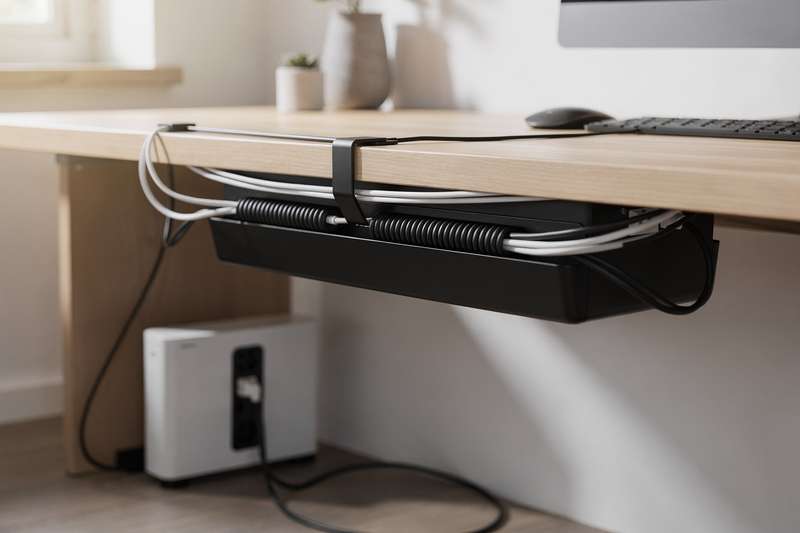
For anyone who wants to get everything off the floor and out of sight under a single desk without reaching for a drill, the Under Desk Cable Management Tray No Drill is a strong choice. It uses a clamp mount that grips the desk edge or frame without any permanent fixings, making it genuinely suitable for rental properties, standing desks with metal frames, or anyone who wants to be able to reposition it later.
The metal mesh construction is the key differentiator here. It’s rigid enough to hold a surge protector and several cables without sagging, while the open mesh design allows air to circulate around whatever power adaptors and bricks end up sitting in there — heat build-up is a real concern when you’re packing electronics into an enclosed box, and mesh sidesteps that problem entirely.
The clamp system comes with anti-scratch pads, so you won’t mark a wooden desktop or powder-coated metal frame. Once installed, the tray sits out of sight and out of mind — you put your power strip in, route cables through the tray, and suddenly the desk surface and floor are uncluttered. The open top also means you can access your cables quickly if you need to swap or add something, rather than having to lift a lid or unzip a sleeve.
The honest tradeoff is aesthetics. From directly underneath, you can see everything in the tray — cables, bricks, zip ties — because there’s no cover. If your desk is at standing height and anyone will regularly look at the underside, it’s less tidy-looking than a closed box. For a standard seated desk in a home office, though, nobody is looking under there, and the practical benefits of accessibility and ventilation far outweigh any cosmetic concern.
Best Under-Desk Tray for Two Desks or a Dual Workstation
If you’re setting up two workstations, fitting out a shared home office, or just want a second tray for a large L-shaped desk, the 2-Pack Under Desk Cable Management Tray delivers the same clamp-mount, metal-mesh format as a single tray but at a unit cost that makes the pair significantly better value. With 133 verified reviews and a 4.5-star rating, it has enough real-world feedback to trust.
Both trays in the pack are identical in design — metal mesh, clamp mount, no-drill installation — so everything said about the single tray above applies here too. The advantage of the two-pack isn’t just price efficiency; it also means you can divide cable management duties between two areas. For a dual-monitor setup, for instance, you might use one tray for the power strip and laptop charger on the left side, and a second for the monitor power supply and USB hub on the right. Splitting the load between two trays keeps each one tidy and accessible.
It’s worth being clear that this isn’t a step up in quality from the single-tray option — it’s the same format. If you only have one desk, buying the single tray is the more considered choice. But for anyone fitting out a full office or dealing with a large corner desk where cable runs emerge from two separate zones, this two-pack removes a separate purchasing decision.
Installation requires the same clamp-fitting process twice, and both trays include the anti-scratch pads. The clamps work on desks of varying thickness, but it’s worth measuring your desk frame before ordering if it’s unusually thin or thick — most standard desks in the 18–25mm range are covered without issue, but very chunky worktops may require some adjustment.
Best for Bundling Desk or TV Cables into One Tidy Run
The shinfly Cable Tidy Sleeve — a 13mm self-closing tube, 3 metres long — is the most useful solution for routing a bundle of cables along a fixed path: down the back of a TV unit, along the underside of a desk, or from a computer tower to a wall socket. It’s a self-closing design, meaning it’s a spiral-cut tube rather than a simple sleeve — you press cables in from the side rather than feeding them through end-to-end, which is genuinely helpful when those cables have bulky connectors already attached.
At 13mm diameter and 3 metres, it’s sized for five to seven cables of typical USB, HDMI, or power-cord gauge. That covers the most common desk scenario: monitor cable, laptop charger, USB hub lead, and a couple of peripheral cables. It’s not designed for chunky power cables or anything thicker — if you’re dealing with kettle-lead style power cables, you’d need a wider sleeve. But for the standard desktop wiring rat’s nest, the sizing is spot on.
The self-closing construction means you can open it back up later to add or remove a cable without cutting anything or wrestling with a zipper. This flexibility is underrated — most cable management projects aren’t one-and-done; setups change, devices get added, and a product that requires you to start from scratch every time you make a change quickly stops being used.
One practical note: 3 metres sounds generous, but once you account for routing around desk legs, following the contours of a TV unit, and adding a little slack at each end, it goes faster than expected. Measure your cable run before ordering. The sleeve is black, which works well in most setups, and the self-closing mechanism stays reliably shut once the cables are inside.
Best for Longer Cable Runs with Extra Accessories
The shinfly Cable Management Sleeve — available as a 3-metre bundle that also includes 20 zip ties, 5 adhesive cable clips, and a wire guide clip — is a fuller package than the standalone sleeve. The sleeve itself comes in two diameters (16mm and 22mm), and having both sizes in one order means you can use the narrower tube for a lighter run of two or three cables and the wider one for the heavier bundle.
The bundled accessories are where this product earns its place in a different category from the standalone version. The adhesive clips let you pin the sleeve to the underside of a desk or along a cable trunking route so it doesn’t droop or drift. The zip ties give you a quick way to secure the sleeve at the entry and exit points. The wire guide clip is a small but useful detail — it helps position the sleeve at a corner or transition point where the cable run changes direction.
For a home office renovation where you want to route cables from desktop to wall to floor in a single clean run, this kit provides most of what you need beyond the sleeve itself. The 4.2-star rating with verified buyers reflects a product that does what it says — the main gripe in reviews tends to be that the adhesive clips are lightweight plastic, so if you’re mounting the sleeve on a textured surface or in a high-traffic area where cables get tugged, you may want to supplement with cable clip nails or stronger adhesive tape.
The 3-metre length again requires measuring up before you order. For a run from a desktop down a monitor arm, across under the desk, and to a wall-mounted power outlet, 3 metres is usually sufficient. For longer wall-to-wall runs in a larger room, you may need to buy two and join them end-to-end.
Best Adhesive Clips for Routing Individual Cables
Not every cable-management problem requires a sleeve or a tray. Sometimes you just need a charging cable to stay in place on a bedside table, a USB lead to run neatly along the back of a monitor, or a single power cord to follow the skirting board without looping across the floor. The [Made in the UK] 10-Pack Adjustable Elastic Self-Adhesive Cable Tidy Clips handle all of those scenarios well. They carry 225 verified reviews and a 4.6-star rating, which is a strong signal of consistent quality for an accessory-tier product.
The adjustable elastic design is the differentiator. Rather than rigid plastic clips that accept only one fixed cable diameter, these stretch to accommodate different cable thicknesses — useful when you’re routing cables of varying gauges along the same surface. The self-adhesive backing attaches to most smooth surfaces: wood, laminate, painted walls, the underside of glass desks. On rough or textured surfaces, adhesion is less reliable, as is standard for any pressure-sensitive adhesive product.
Being made in the UK matters here for a practical reason: quality control tends to be more consistent than with bulk-imported clip sets, and the adhesive formulation is typically better suited to UK climate conditions (moderate humidity rather than the extremes that can affect adhesive performance). That said, no adhesive clip is permanent — they’re best treated as semi-permanent routing guides rather than structural fixings.
Ten clips is enough to route a cable neatly along a full desk run and down to a floor socket, or to manage two or three separate cable runs in a bedroom. If you have a larger setup, buying two packs is worth considering. These clips work best for single cables; if you need to route a bundle, a sleeve or a trunking channel is the better tool.
Best Hook-and-Loop Organiser for Adjustable Desk Setups
If your desk setup changes regularly — standing desk heights adjust, laptop position shifts, peripherals get swapped — you need cable management that moves with you rather than fixing everything permanently in place. The Cable Management Under Desk product, with its adjustable hook-and-loop cable ties and reusable cord holders, is designed precisely for this. At 898 verified reviews and a 4.4-star rating, it’s one of the better-reviewed products in this category on Amazon UK.
Hook-and-loop (Velcro-style) ties have a significant advantage over zip ties for adjustable setups: you can open them, reroute a cable, and refasten them without cutting anything or starting from scratch. For a standing desk where the cable length slack changes as the desk rises and falls, being able to quickly loosen and retighten cable bundles is practically valuable. The product supports up to 15 cords, which covers the most cable-heavy home-office setups.
The enhanced wire holder component — a small shelf or loop designed to mount under the desk — keeps the bundled cables clear of the desk mechanism, preventing them from catching on the height-adjustment motor or hydraulic cylinder. This is a detail that cheaper, generic cable-tie packs overlook entirely. If you own a sit-stand desk and have noticed your cables getting pinched or tangled in the mechanism, this specifically addresses that failure mode.
On the downside, hook-and-loop solutions don’t conceal cables as neatly as a sleeve or trunking run. The cables are gathered and bundled, but they’re still visible. For a home office where appearance matters — client video calls, streaming, or simply personal preference — you might pair these ties with a sleeve or tray for the visible run, using the hook-and-loop ties only for the hidden under-desk portion.
Best Cable Sleeve for Protecting Cables from Pets
If you have a cat or dog that treats cables as chew toys, standard neoprene sleeves won’t provide enough protection — teeth will go straight through thin fabric. The Alex Tech 10ft – 1/2 inch Cord Protector Wire Loom Tubing Cable Sleeve is built from split-loom tubing — a semi-rigid corrugated plastic tube — which offers a meaningful level of physical protection that a soft sleeve cannot. Its 4.5-star rating reflects consistent buyer satisfaction, and the explicit call-out in the product name about protecting against cats is a reliable indicator that the design has been tested against that specific use case.
Split-loom is the industry-standard format for protecting wiring in vehicles and industrial environments, which tells you something about its durability credentials. The 10-foot (approximately 3-metre) length in a half-inch diameter suits power cords, USB cables, and HDMI leads — individually or in a small bundle. The split running the length of the tube allows you to press cables in from the side rather than threading them through, which is essential when you have connectors already attached.
The tradeoff versus a fabric sleeve is aesthetics. Split-loom tubing has a utilitarian, industrial look — fine for behind a sofa or under a desk, less appealing on a visible cable run where the sleeve is in plain view. It’s also slightly more difficult to route around tight corners than a flexible fabric sleeve. For the specific problem of pet-damaged cables, though, it’s the appropriate tool. Replacing chewed cables repeatedly is both costly and a fire risk — a one-time investment in protective tubing is the practical solution.
One installation note: the half-inch diameter is suited to one or two standard cables comfortably. If you’re trying to protect a thicker power cable or a bundle of three or four leads, consider sizing up. Alex Tech offers wider versions in the same split-loom format if your cable gauge demands it.
What to Look For When Buying Cable Management
The first decision is always about cable type and quantity. A single phone charging cable that keeps falling off a bedside table needs something entirely different from a full desk setup running a monitor, laptop, USB hub, speakers, and a lamp. Before buying anything, count your cables and measure the longest run you need to manage — these two figures will tell you whether you need a tray, a sleeve, clips, or a combination of all three.
Installation method matters enormously, especially if you rent. No-drill clamp mounts and pressure-sensitive adhesive products leave no permanent marks, but adhesive strength varies by surface — smooth laminate and glass hold well; textured brick or rough-painted walls hold poorly. If you own your property and want something permanent, clip nails and wall-mounted trunking channels will outlast any adhesive solution. Always check what’s behind a wall before hammering into it.
Ventilation is an often-overlooked consideration for any product that encloses a power strip or a collection of power adaptors. Enclosed plastic boxes can trap heat, which shortens the life of electronics and in rare cases creates a hazard. Metal mesh trays avoid this entirely. If you do use an enclosed box, check that it has ventilation openings and don’t pack it so tightly that airflow is blocked.
Cable access frequency should guide your choice between permanent and removable solutions. If you plug and unplug devices daily — external hard drives, cameras, portable speakers — a closed sleeve that requires unzipping or a tray with a lid you have to remove will frustrate you within a week. Open-top trays, self-closing sleeves, and reusable hook-and-loop ties accommodate regular access far better than solutions designed to be installed once and forgotten.
Finally, think about scalability. Home office setups grow over time — a second monitor, a new webcam, a docking station. A cable management system that is perfectly calibrated for today’s setup but has no room to expand forces you to start again from scratch. Choosing products with adjustable capacity — wider sleeves, larger trays, modular clip kits — means you can adapt without a full reinstall.
Verdict
For the majority of UK home-office setups — a single desk, a laptop or desktop, a monitor, and a handful of peripherals — the Under Desk Cable Management Tray No Drill is the most effective first step. It tackles the biggest source of visible cable chaos — the floor and the desk surface — in one action, takes under ten minutes to fit, and doesn’t require drilling, gluing, or any tools beyond your hands. The metal mesh construction handles real-world loads without sagging, and the open-top design keeps things accessible when your setup changes.
If your setup spans two workstations or a large L-shaped desk, upgrade to the two-pack version. If you have pets that chew cables, add the Alex Tech split-loom sleeve to protect the most vulnerable runs. And if your problem is specifically a TV cable run down a wall rather than a desk, the adhesive clips or the shinfly self-closing sleeve are the tools to reach for. Start with one product that solves your most visible problem — cable management done in stages is far more likely to stick than trying to overhaul everything at once.
We were not paid to feature any specific product in this guide. All opinions are independent and based on publicly available specifications, verified buyer feedback patterns, and category research.
Quick Comparison Table


![[Made in the UK] 10-Pack Adjustable Elastic Self-Adhesive Cable Tidy Clips, Cable Management Organiser for Office, Home, Under Desk, Behind TV, Charging Phone, Laptop, PC, HDMI, USB (Black)](https://m.media-amazon.com/images/I/81oe4A8TFQL._AC_UL320_.jpg)


FAQ
What is the easiest no-drill cable management solution for a rented flat?
Clamp-mount under-desk trays and self-adhesive cable clips are the two formats that leave no permanent marks. Clamp mounts grip the desk frame from below; adhesive clips stick to smooth surfaces and can usually be removed cleanly. Avoid clip nails or wall-mounted trunking if you want to preserve your deposit — both require fixings that will leave marks on walls or skirting boards.
How do I manage cables on a standing desk that moves up and down?
The key is leaving enough slack in each cable to accommodate the full range of height adjustment without pulling taut at maximum height. Group cables into a bundle using reusable hook-and-loop ties rather than fixed zip ties, so you can adjust the bundle length easily. A dedicated cable management tray or hook mounted under the desk keeps the slack neat when the desk is at its lowest position.
Is it safe to put a power strip inside an enclosed cable management box?
It depends on the box design. Fully enclosed plastic boxes with no ventilation can trap heat from power adaptors and surge protectors, which shortens component life. Look for boxes with ventilation openings, or use an open-mesh tray instead. Never fill an enclosure so tightly that air cannot move through it, and avoid enclosing power strips that are running at high load for extended periods.
How do I stop adhesive cable clips from falling off over time?
Adhesive performance depends on surface cleanliness and texture. Before fitting any adhesive clip, clean the surface thoroughly with isopropyl alcohol and allow it to dry completely. Press the clip firmly for at least thirty seconds. If clips still loosen over time — common in warmer rooms or on surfaces that flex slightly — supplement with a small piece of double-sided mounting tape behind the adhesive pad for extra grip.
What’s the difference between a cable sleeve and cable trunking?
A cable sleeve is a flexible tube — fabric, neoprene, or split-loom plastic — that wraps around a bundle of cables, keeping them together and protected. Trunking is a rigid or semi-rigid channel, typically wall-mounted, with a removable lid that cables sit inside. Sleeves are better for desk runs and hidden areas where the bundle needs to flex; trunking is better for wall-mounted runs where you want a flat, painted-to-match finish that’s truly invisible.
How many cables can a typical under-desk tray hold?
It varies by tray size, but a standard metal mesh under-desk tray in the 13–15 inch range can comfortably hold a six-way power strip plus four to six loose cables on top. The limiting factor is usually width rather than weight — a power strip with several bulky transformer plugs sticking out sideways can exhaust the tray’s capacity quickly. If your power strip has side-entry sockets or compact adaptors, you’ll fit significantly more into the same tray.