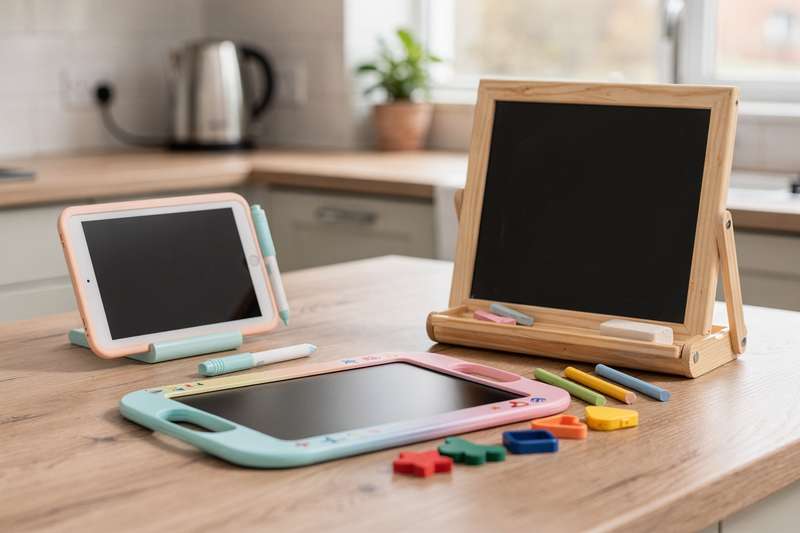
Picture this: it’s a rainy Saturday afternoon, you’ve run out of colouring books, the felt-tips have bled through onto the dining table, and your four-year-old is eyeing up the cream kitchen wall with a look that spells disaster. You’ve tried plain A4 paper — it disappears at an alarming rate and half the drawings end up on the floor. You’ve tried a traditional whiteboard — the markers leak everywhere and the cleaning spray is its own hazard around small children. And handing over a tablet or phone is the nuclear option: once that screen time starts, it’s almost impossible to wind down without tears.
What you actually want is something that lets a child draw freely, erase independently, and start again without involving you every few minutes. That’s the practical niche that LCD drawing and writing boards fill. No ink, no paper, no cleaning spray, no charging cable trailing across the kitchen floor. Press a button, the screen clears, and you’re back to a blank canvas in seconds. This guide covers seven of the best drawing and writing boards available on Amazon UK right now — from budget twin packs designed for siblings to large rechargeable boards that give older children real room to work.
How We Chose These Boards
Choosing between products in this category is more nuanced than it first appears, because the underlying technology is similar across most boards: LCD liquid-crystal surfaces that erase at the press of a button. What actually separates good from mediocre is screen size and usability for the intended age group, display type (mono LCD, colour LCD, or LED), whether a lock function prevents accidental erasure, how the board is powered (disposable batteries versus USB rechargeable), pack count and value, and build durability. Where Amazon UK buyer reviews existed, I looked for consistent patterns in feedback — reliable erase buttons, screen longevity, and realistic colour expectations. Several products in this lineup have no UK reviews yet; I flag this clearly in each relevant section and rely on specification and design features rather than inventing validation that isn’t there. The Methodology reflects what was actually available, not an idealised process.
Best Overall for Young Artists: 16 Inch Drawing Tablet
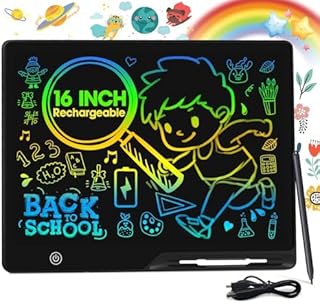
The 16 Inch Drawing Tablet sits at the top of this list for a straightforward reason: 646 Amazon UK ratings averaging 4.3 stars is a meaningful signal in a category where many alternatives have no reviews at all, and the 16-inch screen gives children the room to draw that smaller boards simply cannot match.
Size matters for young artists in ways that are easy to underestimate when shopping online. Children aged three to eight tend to draw with generous arm movements — big circles, long sweeping lines, characters that sprawl across the page. Cramming all of that onto an 8.5-inch board is frustrating for them in the same way that drawing on a Post-it Note would frustrate an adult. At 16 inches, roughly comparable to an A3 sheet in width, this board removes that constraint and lets children draw at a scale that feels natural to them.
The detail that stands out most in the specification is that the board ships with two stylus pens rather than one. This is practically useful rather than a marketing flourish. Anyone who has bought a child a device with a single stylus knows what tends to happen: the pen vanishes within a week, leaving the board unusable until a replacement arrives. Having a spare from the outset is sensible forward-planning, and both pens appear to be tethered to the board to limit their wandering.
The writing technology is standard LCD — pressure-sensitive liquid crystals that produce a line when the stylus contacts the surface and clear in a single button press. The “Wipeable and Reusable Magic Board” language in the product title is marketing terminology for this erase mechanism, not an indication of a separate technology. The board produces lines in a single tone against the LCD background rather than full-colour strokes. If you’re expecting vivid crayon colours from the stylus, this won’t deliver that — but as a drawing and writing surface for daily use, it works well.
The 4.3-star average across 646 reviews is positive but not perfect. A proportion of reviewers note that the erase button requires firm pressing initially, though this typically eases with use. The screen surface, as with all LCD boards at this size, is not built to withstand impact or pressure from sitting on it — treat it as a drawing tool rather than a toy that can be thrown around a bag without care. The listing targets girls aged three to eight, though there is nothing about the design itself that limits it to one gender or that specific bracket within the stated age range.
Best Rechargeable Doodle Board: POPERFUN 16 Inch LCD Writing Tablet
The POPERFUN 16 Inch LCD Writing Tablet is the best-reviewed product in this lineup by raw review count — 763 ratings at 4.3 stars is a meaningful sample in a category where many competitors carry no reviews at all — and its built-in USB rechargeable battery is the feature that sets it apart from the standard LCD boards here.
The rechargeable element matters more than it might initially seem. Most LCD writing boards at this size run on button cell batteries to power the erase function. These are small, awkward to source at short notice, and need replacing every few months in a household with enthusiastic young drawers. A rechargeable board removes that maintenance entirely: plug in a USB cable when the battery is low, wait, and carry on. For parents already managing chargers for multiple devices, one additional USB port is simpler than tracking down the correct button cell size before school on a Monday morning.
At 16 inches, the POPERFUN matches the screen size of the previous pick, giving children the same generous drawing area. The listing targets ages three to four primarily, but the surface area is comfortable through the early primary school years — children practising letter formation, number writing, or simple diagrams will find the space adequate. The “Colorfuls Doodle Board” description indicates this is a colour LCD board, where the drawing surface has a coloured or gradient background rather than a plain white or grey one. This gives the board a visually appealing look on a desk and tends to attract children’s attention more readily than a mono LCD board.
One clarification worth making about colour LCD boards in general: the background is colourful, but the lines you draw are still a single tone against that background. You will not get rainbow-coloured strokes from a single stylus on a standard LCD board. If multi-colour drawing from the pen itself is the goal, look for a board with a colour-switching pen rather than a colour-background LCD. If you want a bright, attractive drawing surface that provides real room to work, the POPERFUN delivers exactly that.
With 763 ratings at 4.3 stars, the buyer sentiment is consistent. Review patterns in this product category typically flag screen longevity and erase button reliability as the two primary durability concerns, and the POPERFUN’s score holds up against both. If you want a single rechargeable board for one child aged three to eight and would like that purchase backed by the largest review base in this guide, this is the most natural starting point.
Best Budget Twin Pack: SOL 2pk Kids Drawing Tablet
When you have more than one child who wants to draw, a single board creates a different kind of problem. The SOL 2pk Kids Drawing Tablet addresses this directly by arriving as a matched pair, making it one of the more sensible purchases for siblings or for households where sharing drawing time in turns is not realistic.
The SOL pack holds 33 Amazon UK reviews at 4.4 stars — a smaller sample than the two large boards above, but an above-average rating that suggests buyers are broadly getting what they expected. For twin packs at a budget price point, the key risks are inconsistency between the two boards or build quality that deteriorates within weeks. A 4.4-star average across 33 reviews is a reasonable indicator that neither problem is widespread here.
SOL is not a brand with wide recognition outside the children’s toy category, but in this product space that matters less than you might expect. Most LCD writing tablets at this price tier are manufactured through similar supply chains, and brand prestige has less impact on whether the erase button works reliably than individual quality control does. The reviews available here suggest the SOL boards perform as described in the listing.
Twin packs deliver practical value on several levels. The most obvious: two children can draw simultaneously without negotiating turns. Less obviously, the twin-pack format works well as a one-at-home, one-at-school solution. If your child carries a bag to school or activities, having a dedicated board for each setting avoids the frustration of the board being in the wrong place when needed. As gifts, the twin pack also offers flexibility: one for the recipient, one as a spare or for a sibling who might otherwise feel overlooked.
A note on screen size: the listing does not make dimensions immediately prominent in the title, so check the current Amazon product page for exact measurements before purchasing. Budget twin packs in this category typically run at 8.5 to 10 inches per board, which suits younger children — roughly ages two to six — well but can feel snug for older primary school children who want more drawing room. If you are buying for a seven- or eight-year-old with ambitions to fill large surfaces, the 16-inch single boards in this guide may be more satisfying. For younger children, or as a first board for a child who has not used one before, the twin pack at a budget price is a low-risk introduction to the format.
At the budget end, some practical durability compromise is expected. LCD boards in this tier are not designed to survive being sat on, stepped on, or dropped from height. The stylus is a simple plastic-tipped pen, and the erase button is the mechanical component most likely to show wear with heavy use. Handled as a drawing tool rather than a general-purpose toy, the SOL boards serve their purpose well; used as an all-day stress object by a particularly energetic toddler, results will vary.
Best for Toddlers: Genialba 2 Pack LCD Drawing Tablet for Kids
The Genialba 2 Pack LCD Drawing Tablet for Kids is pitched explicitly at the youngest end of this guide’s audience — the listing calls out “Toddler Toys” in the title — and the 10-inch format represents a sensible size choice for children aged two to four who are just beginning to explore drawing.
Full transparency upfront: this product has no Amazon UK buyer reviews at the time of writing. The rating shown on the product page likely reflects a platform default rather than verified buyer experience. That means this assessment relies on specification, design, and comparison with similar products in the category rather than patterns from real purchasers. If a well-reviewed alternative matters to you, the POPERFUN and the 16 Inch Drawing Tablet are supported by substantial buyer feedback. The Genialba is included here because the twin-pack format at 10 inches is specifically appropriate for the toddler demographic in a way that the larger 16-inch boards are not.
Genialba appears across multiple LCD tablet listings on Amazon UK, which provides some confidence that this is an ongoing product range rather than a one-listing operation. The 10-inch size is the key specification for toddlers. An 8.5-inch board can feel cramped as a child grows; a 16-inch board is physically awkward for a two-year-old whose arm span is still developing. Ten inches is a practical middle ground — generous enough for expressive marks, manageable enough for small hands to work across the full surface without stretching.
The “Colorful LCD” designation indicates a colour-background display, which works in the toddler’s favour visually. Young children respond strongly to brightness and colour; a board with a gradient or coloured background is more likely to capture a toddler’s attention and keep it there than a plain mono LCD surface. The stylus is a straightforward plastic-tipped pen requiring no batteries or charging for the drawing function, which is appropriate for the age group. Toddlers are not interested in pen ergonomics; they are interested in whether pressing the surface makes something appear.
One of the most useful aspects of LCD boards for toddlers is the draw-erase-repeat loop. Very young children are often less concerned with preserving their drawings than with the act of drawing itself. The ability to press a button, watch the screen clear instantly, and start again reinforces cause-and-effect understanding and keeps the activity engaging across multiple sessions. Without reviews, the sensible approach is to buy from a seller with a clear returns policy and treat the first few days as a practical trial period to verify that the erase button and screen surface meet expectations.
Best with Lock Function: LCD Writing Tablet 10 Inch Doodle Board
The LCD Writing Tablet 10 Inch Doodle Board is included in this guide for one specific feature that most boards in this category omit: a lock function that prevents the erase button from accidentally clearing the screen. If you have watched a child’s face fall because their drawing disappeared the moment they rested a hand near the erase button, you will understand why this is worth seeking out.
Transparency first: this product carries no Amazon UK buyer reviews at the time of writing, and the on-page rating likely reflects a default rather than verified feedback. This is a specification-based assessment. If a strong review track record is your primary criterion, the POPERFUN and the 16 Inch Drawing Tablet are the validated alternatives in this guide. The lock function, however, is a specific and useful feature that justifies flagging even without review backing — it is absent from most of the other boards here.
The board is 10 inches — larger than the standard 8.5-inch compact boards and noticeably smaller than the 16-inch large-format options. For children aged four to eight using the board for drawing, letter practice, and diagrams, 10 inches offers adequate space without the weight and bulk of a larger surface. The listing highlights “portable” as a key attribute, and a 10-inch form factor does fit into a school bag more comfortably than a 16-inch board, which helps if the board needs to travel between home and school regularly.
The lock mechanism typically works by activating a switch that disables the erase circuit, meaning the erase button does nothing when locked. Drawing continues normally — only the erasure is blocked. The practical workflow becomes: draw, press lock to protect the work, show it off, press lock again to unlock, erase when ready. Children aged five and above can generally manage this independently; younger children may need a parent to operate the lock on their behalf. For a child practising handwriting who wants to complete a full line before clearing, or for a parent who wants to check written work before it disappears, this feature adds utility that the other boards in this guide do not offer.
Given the absence of reviews, the primary unknown is build quality — specifically whether the lock mechanism is robust enough for energetic hands. At this price tier, mechanical features like lock switches can show wear faster than the screen itself. Buy from a seller with a clear returns policy, and if the lock function is your central reason for purchasing, treat the first week as a practical trial period to confirm it operates reliably under normal use.
Best for On-the-Go Use: TEKFUN 2 Pack LCD Writing Tablet
The TEKFUN 2 Pack LCD Writing Tablet has one detail that separates it from most boards in this guide: a lanyard attachment point. For parents who travel or visit busy places with young children, the option to hang a drawing board around a child’s neck or clip it to a bag makes a real practical difference. Misplaced boards in restaurants, waiting rooms, and airports are a familiar frustration, and the lanyard is a straightforward engineering solution to a genuinely common problem.
Full transparency: this specific TEKFUN twin pack has no Amazon UK buyer reviews at the time of writing. TEKFUN has a broader presence across Amazon UK’s children’s product listings, which provides some confidence in the manufacturer, but the specific listing here (B0BCPYRGJ8) is unreviewed. This is a specification-based assessment, and purchasing it means buying on design features rather than verified buyer experience.
The 8.5-inch size is at the compact end of the market. For toddlers and children under five, this is actually a comfortable scale — small enough for little hands to reach all corners of the drawing surface, light enough to carry without complaint, and compact enough to fit in a changing bag, handbag, or car door pocket. For older children (six and up) who want more room to draw, this size will feel limiting; steer them towards the 10-inch or 16-inch options in this guide instead.
The “Colorful” tag in the listing places this in the colour LCD category — a coloured background on the drawing surface. Each of the two boards in the pack includes its own lanyard, meaning both are ready to attach to a child immediately. If you’re heading to a long restaurant dinner or car journey and want to hand each child a board that won’t get lost, the twin pack with integrated lanyards is a considered solution. Power comes from standard batteries rather than USB charging, which is an advantage in travel scenarios specifically: you don’t need a USB port to restore function, just a spare battery cell. Check the Amazon listing for the battery type required before a long trip so you can keep a replacement at hand.
The absence of reviews means build quality is unconfirmed. Purchase from a seller with a straightforward returns policy and test the erase button reliability in the first few days — this is consistently the component most likely to show quality variation in this product type, and catching a fault early makes the returns process much simpler.
Best for Glowing Artwork: LED Note Board with Colors
The LED Note Board with Colors is a different kind of product from everything else in this guide — and it requires honest caveats before any recommendation. With seven Amazon UK reviews averaging 3.4 stars, it is the lowest-rated and least-reviewed product in this lineup. That is a real signal, not a detail to pass over lightly.
Why include it? Because it serves a purpose none of the other boards address. Unlike the LCD tablets in this guide — which erase electronically and work via liquid-crystal pressure sensitivity — the LED Note Board uses a backlit acrylic panel. Lines drawn with the included 7-colour pen glow against the illuminated surface, creating an effect closer to a neon sign or light box than a children’s drawing tablet. In a dimly lit bedroom or on a study desk, the visual impact is striking in a way that a standard LCD board simply cannot replicate.
The board ships with a stand, meaning it can sit upright on a desk or shelf as a display piece rather than lying flat. This reflects its real purpose: drawing something you want to look at, photograph, or use as a temporary room feature. It is less suited to the high-frequency draw-erase-repeat loop of a practical writing board and more suited to a creative display context — think of it as a novelty light-up message board rather than a functional drawing tablet.
The 7-colour pen is central to the experience. If that pen is lost, the distinctive functionality of the board largely disappears with it — unlike a tethered stylus on an LCD board, which is much harder to misplace. This pen dependency is a fragile point worth factoring in before purchasing, particularly for younger children who lose items readily.
The 3.4-star average across seven reviews is too small a sample to draw firm conclusions from, but below-average ratings in this product type often point to LED longevity issues, flimsy stands, or novelty wearing off faster than expected. Approach this as a creative decoration purchase or a gift for a child who loves glowing, light-up things — not as a primary everyday drawing tool. For daily drawing and writing practice, the POPERFUN or the SOL twin pack are far more practical and far better supported by buyer feedback. If the glowing LED aesthetic is specifically what you’re after and you understand the tradeoffs, the LED Note Board with Colors fills a niche that none of the other picks in this guide can.
What to Look For in a Drawing and Writing Board
- Screen size and drawing area: Boards in this category typically run from 8.5 to 16 inches. Toddlers and children under five are well served by 8.5 to 10 inches — easier to manage and proportionate to smaller hands. Children from five upwards benefit from 10 to 16 inches. A larger surface reduces frustration for expressive drawers but adds weight and reduces portability.
- Display type — mono LCD, colour LCD, or LED: Mono LCD boards produce a single-colour line on a light background. Colour LCD boards have a coloured or gradient background that looks more appealing on a desk. LED acrylic boards glow and function better as display pieces than everyday drawing tools. None of these produce full rainbow-coloured strokes from a single stylus — understanding this before you buy avoids disappointment.
- Lock function: An erase lock prevents the board from being cleared accidentally when a child’s hand bumps the erase button. Particularly useful for children under five and for structured use such as handwriting practice, where preserving work until an adult has reviewed it genuinely matters.
- Power source: The drawing surface on an LCD board requires no power. The erase function typically uses a button cell battery. Rechargeable boards (via USB, like the POPERFUN) remove the need for replacement batteries; standard battery boards are simpler and more practical when USB access isn’t available, such as on long car journeys.
- Pack count and value: Twin packs deliver better per-unit value and solve the problem of multiple children wanting to draw simultaneously. Single large boards are better suited to solo use where maximum screen size is the priority.
- Portability features: If the board will travel in a school bag or be used on the go, look for a compact form factor (under 10 inches), light weight, and ideally a lanyard attachment point. Large 16-inch boards are best treated as home products rather than daily-bag items.
- Build quality and stylus attachment: The erase button is the mechanical component most likely to fail with heavy use. Styluses tethered to the board are far less likely to go missing than loose ones. Buying products with a substantial review base reduces the risk of quality control issues — boards with no reviews require a greater leap of faith and a good returns policy as a safety net.
Verdict
For most parents buying a drawing and writing board for one child aged three to eight, the POPERFUN 16 Inch LCD Writing Tablet is the most straightforward recommendation. Its rechargeable battery removes the ongoing hassle of button-cell replacements, the 16-inch screen gives children real room to draw rather than cramping their work, and at 763 ratings averaging 4.3 stars it is the most thoroughly validated purchase in this guide.
If you have two children who will want their own board simultaneously, the SOL 2pk Kids Drawing Tablet is the smarter buy. The twin-pack format at a budget price point addresses the sibling problem without doubling your spend, and its 4.4-star average across 33 reviews is encouraging for a compact, budget-tier option.
For toddlers specifically, where scale and simplicity matter more than features, the Genialba 2 Pack at 10 inches is appropriately sized for small hands — though without reviews it requires more trust than the alternatives above. If you prefer a reviewed option for a confident three-year-old, the POPERFUN is manageable at that age too, and its rechargeable design is a long-term convenience worth the slight size difference.
The LED Note Board with Colors is the most distinctive option in the guide, but its below-average rating and niche use case make it a secondary consideration rather than a primary recommendation. Treat it as a creative decoration purchase rather than a practical daily drawing tool, and set your expectations accordingly.
This guide was produced independently. No payment was received to feature any specific product. All assessments are based on available product specifications, design features, and buyer review patterns on Amazon UK where reviews existed at the time of research.
Quick Comparison Table
![[2 Pack] Genialba 8.5 inch LCD Drawing Tablet for Kids Colorful Screen Writing Board Toddler Toys Learning Educational Stocking Fillers Kids Gifts for for 3 4 5 6 7 Year Old Boys Girls, (Pink&Blue)](https://m.media-amazon.com/images/I/81aWHdRhZnL._AC_UL320_.jpg)


FAQ
What is an LCD writing tablet and how does it work?
An LCD writing tablet uses a layer of liquid crystals sandwiched between two surfaces. When you press a stylus onto it, the pressure aligns the crystals and makes the mark visible. A small battery powers a brief electrical pulse via the erase button, resetting the crystals and clearing the screen instantly. No ink or paper is involved, and the drawing surface requires no power at all — only the erase function uses the battery.
Are drawing and writing boards safe for toddlers?
LCD drawing boards do not use any ink, paint, or chemicals on the screen surface, making them safe in terms of mess and ingestion risk from the board itself. The stylus is typically a hard plastic-tipped pen, so adult supervision makes sense for children under three. Always check the minimum age recommendation on the specific Amazon product listing before buying for the youngest children, as some products include small components.
Can you partially erase an LCD writing tablet?
Standard children’s LCD writing tablets erase the entire screen in a single button press — selective or partial erasure is not a feature at this level. Some adult-oriented tablets offer partial erase functionality, but the boards in this guide clear fully and instantly. A lock function, where available, protects a drawing from accidental erasure, but once you choose to clear the screen, everything goes in one press.
How long do the batteries last in an LCD drawing board?
Because the battery only powers the erase function rather than the drawing surface itself, button cell batteries in standard LCD boards typically last several months under normal household use. When they begin to fail, the erase function becomes unreliable before stopping entirely, giving you some advance notice to source a replacement. Rechargeable boards like the POPERFUN avoid the question altogether, topping up via USB like any other device.
What is the difference between an LCD writing tablet and an LED board?
LCD writing tablets work by applying stylus pressure to liquid crystals and erase electronically at the press of a button, requiring no external light and functioning as practical everyday drawing tools. LED boards use a backlit acrylic panel to make marks glow, making them better suited to decorative display than daily writing or drawing. For handwriting practice, letter formation, or general doodling, LCD is the more functional and durable choice.
From what age can children start using a drawing board?
Most children’s LCD drawing boards list a minimum age of around three years, largely because of the small stylus pen. From around two years old, with supervision and a tethered stylus, many toddlers can engage meaningfully with the draw-and-erase loop, which supports fine motor development and cause-and-effect understanding. It is an appropriate activity earlier than you might expect — within reason and with adult oversight for the youngest children.