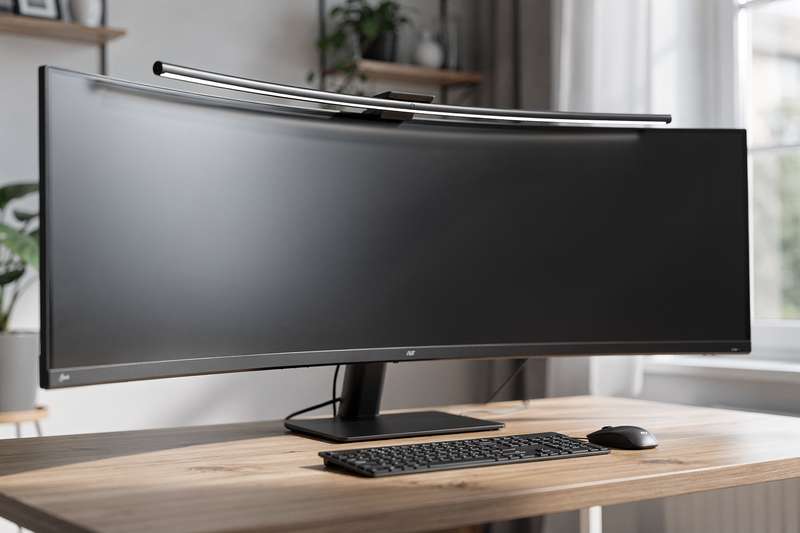
You’ve finally upgraded to that 49-inch ultrawide curved monitor — the one you spent weeks researching, comparing refresh rates and panel types, deliberating over resolutions. It dominates your desk in exactly the way you hoped. Then you sit down for a long work session and realise you’ve simply traded one frustration for another. The overhead light in your home office bounces off that sweeping curved panel at a completely different angle than it did on your old flat screen. The desk lamp you carefully positioned for your 27-inch display now creates a dull smear of reflection across the middle of your ultrawide that shifts whenever you move in your chair.
Standard solutions don’t fix this. Repositioning the desk lamp just moves the glare to a different zone on the curve. Closing the blinds helps the screen but leaves your keyboard in shadow. A ring light creates a reflection visible in the glossy sections of the bezel. What you need is a light source that sits above the monitor, directs its output downward toward your desk and keyboard, and is specifically designed not to touch the screen face. That’s precisely what a monitor light bar does — but most are engineered for flat 27–32-inch displays. A 49-inch ultrawide, with its pronounced curve and often-deeper bezel, presents a different set of clip, length, and optical requirements that a standard monitor light bar review rarely addresses properly.
This guide focuses on that specific situation. The picks below are evaluated against the real-world demands of large curved ultrawide screens: clip compatibility with curved bezels, bar length relative to a wide desk span, and optical design that handles the curved geometry without scattering light back at the screen. If you’ve been frustrated by generic light bar recommendations that turned out to be wrong for your setup, this guide is written for you.
How These Picks Were Evaluated
Selecting a monitor light bar for a 49-inch ultrawide calls for different criteria than choosing one for a typical flat display. The curved bezel creates real clip compatibility challenges that don’t apply to flat-screen buyers. The horizontal span of the panel affects how evenly a bar can illuminate a wide desk surface. The bezel depths on desktop-grade ultrawide monitors are often greater than those on smaller consumer displays, pushing the limits of what standard clips can grip securely.
For each product in this guide, the evaluation covered: bar length and its practical effect on desk illumination coverage; clip design and the maximum bezel thickness it accommodates; rated brightness output at desk level; CRI (colour rendering index — a measure of how accurately the light represents the true colour of physical objects); colour temperature range and adjustment precision; and whether the optical design reliably prevents light from scattering onto the screen. Where buyer reviews exist in meaningful volume, patterns across verified feedback were analysed to identify recurring strengths and issues. Three products here carry no Amazon UK reviews at the time of writing — each such section states this plainly and relies instead on published specifications, the manufacturer’s track record across their reviewed models, and category-level evidence.
Best Overall: Quntis Curved Monitor Light Bar 45cm with Touch Control & Remote Control
The Quntis Curved Monitor Light Bar 45cm with Touch Control & Remote Control is the strongest all-round choice in this category for a 49-inch ultrawide home office setup. With 154 verified buyer reviews and a 4.6-star average on Amazon UK, it has enough real-world feedback to trust — and the pattern of that feedback points consistently toward one thing: it works reliably on curved screens without clip instability or the setup frustrations that cheaper alternatives often produce.
The key differentiator against the other Quntis models in this guide is the combination of a 45cm bar span, 1,200 lux brightness output, and a dual-control system that pairs touch controls on the bar with a wireless remote. Touch controls are quick for on-the-fly brightness changes mid-task. The remote covers situations where the monitor is at arm’s length or you’d rather not disrupt your workflow to lean forward. Both options serve different moments in a working day, and buyers consistently mention this arrangement as a practical convenience rather than redundancy.
Brightness rated at 1,200 lux at desk level gives you real headroom for adjustment. Many mid-range bars are rated at 900 lux, which is workable but leaves little room to dial down and still see clearly. At 1,200 lux you can run the bar at 60–70% for comfortable everyday use, keep dimming reserves for dark evenings, and push to full output when working under natural light you’re trying to match. The colour temperature range covers warm through cool white, with auto-dimming built in to adjust output in response to room ambient light — useful in a home office where conditions change throughout the day.
The clip design handles the geometry of a curved bezel adequately, which is the fundamental challenge for any bar on a 49-inch ultrawide. Reviewers who specifically mention curved screens report stable mounting without forward creep during typing sessions. The clip handles the standard bezel depth range you’d encounter on most desktop ultrawide panels, though if your specific monitor has an unusually deep bezel, confirming measurements before ordering is sensible.
The tradeoffs are honest rather than critical. The wireless remote feels lightweight at this price tier — functional but not substantial. Some buyers in the review pool note that wireless range can be inconsistent in rooms with significant RF interference; keeping it roughly in line-of-sight resolves this in most cases. The bar doesn’t offer RGB backlight or motion sensing, so if those features matter to your setup, one of the other picks below covers them. If you want a single dependable mid-range option with verified real-world performance on curved panels, this is the bar to start with.
Best Budget Pick: Computer Monitor Lamp, Dimmable Monitor Light Bar Curved Screen Lamp
The Computer Monitor Lamp, Dimmable Monitor Light Bar Curved Screen Lamp is the right starting point if you want to confirm that monitor lighting works for your setup before committing to a higher spend. It carries 537 reviews on Amazon UK with a 4.3-star average — the largest review pool of any product in this guide — and that volume tells you something useful: a significant number of buyers have used it, and the majority found it worth leaving a positive rating.
This bar powers via USB, which means running a cable to a spare port on your monitor, desktop, or a USB charger rather than a dedicated wall adapter. For most ultrawide setups this is genuinely convenient — modern monitors typically offer one or two USB-A ports on the side or rear, and a single cable from monitor to light bar keeps the desk tidier than a mains-powered unit with its own adapter. The asymmetric optical design directs light toward the desk and keyboard rather than at the screen, so you won’t get the hotspot glare that a conventional desk lamp creates when positioned above the monitor.
Dimming on this bar is stepless — continuous adjustment rather than fixed presets — which is a meaningful advantage over budget options that only offer three or five discrete brightness levels. Stepless control lets you find the exact comfortable level without settling for a step that’s slightly too bright or too dark. Colour temperature adjustment offers preset positions covering warm to cool white, which handles the practical range for most working conditions without the full flexibility of stepless temperature control.
The tradeoffs are visible but not disqualifying at this price tier. The clip mechanism works on monitors with standard bezel depths, but some 49-inch ultrawide panels have atypically deep or angled bezels that require careful positioning on first install. Reviewers don’t report the bar falling off — 537 reviews would reliably surface that issue — but some note that getting the initial positioning right on a curved screen takes a few minutes of patient adjustment. Build quality is functional rather than refined: adequate plastic housing, consistent light output, but not a product designed to outlast its warranty by years.
If you’re buying a light bar for the first time, or setting up a secondary monitor on a tighter budget, this is the right entry point. The volume of reviews means you’re buying with significant community validation behind you. If you find the colour temperature flexibility or brightness ceiling of this bar limiting after a few weeks, you’ll have direct experience to specify what you need from an upgrade — and you’ll have spent considerably less reaching that conclusion.
Best Everyday Mid-Range Pick: Quntis 41cm Curved Monitor Light Bar Wireless Remote Control
The Quntis 41cm Curved Monitor Light Bar Wireless Remote Control, 76LED 900Lux is the most thoroughly reviewed Quntis model in this guide, with 261 Amazon UK ratings at 4.4 stars — a review pool that gives a more reliable read on long-term performance than the newer models can currently match.
At 41cm, this is the shortest bar in this guide, and that’s worth flagging in a 49-inch ultrawide context. The bar illuminates the desk below rather than spanning the screen width, but a 41cm bar concentrates brightness in the central working zone. If your setup has documents, a notepad, or peripherals spread toward the edges of your monitor’s footprint, the light coverage may fall off at the extremes in a way that longer bars avoid. For a standard keyboard-and-mouse configuration centred under the screen, 41cm is entirely adequate for the job.
Brightness is rated at 900 lux with a CRI of 95 — colour rendering at that level means physical materials on your desk look natural and consistent rather than flat or slightly grey. The colour temperature range runs from 3000K warm white through to 6500K cool daylight, adjusted steplessly via the wireless remote. That covers the full practical range for working across different times of day. The remote is functional with clearly labelled controls you can operate without looking away from your screen.
The clip is built specifically for curved monitors and handles the standard bezel depth range found on most desktop ultrawide panels. Reviewers note consistent mounting stability with no tendency for the bar to shift during normal desk use — typing, adjusting the keyboard position, and accidental nudges to the desk don’t cause movement. That stability matters because cheaper clip designs on curved bezels can gradually creep forward, eventually tipping the bar out of its optimal position.
Compared to the Best Overall pick, this bar trades the higher lux ceiling, touch controls, and auto-dimming for a lower spend and the confidence of a broader verified review base. If you’ve already got effective room lighting and just want targeted desk illumination without automation features, this is a sensible and well-validated choice. The CRI 95 rating is particularly strong for a bar at this price tier — many competitors offer CRI 85 or below, and the difference in colour accuracy is noticeable when comparing physical samples to on-screen colour references.
Best for Gaming and RGB Setups: Quntis Curved Monitor Light Bar 45cm with RGB Backlight & Music Sync
The Quntis Curved Monitor Light Bar 45cm with RGB Backlight & Music Sync is the pick for setups where the visual character of the lighting matters alongside its functional output. With 29 reviews and a 4.4-star average on Amazon UK, the sample size is relatively modest — but it’s sufficient to establish that buyers who chose it specifically for RGB functionality report vivid colours and a music sync mode that responds convincingly to audio rather than randomly flashing.
This bar performs two simultaneous jobs. The front-facing LEDs function as a standard monitor light bar: asymmetric white light directed downward toward the desk and keyboard for work and reading tasks. The rear-facing section adds ambient RGB backlight behind the monitor, providing a bias-lighting effect that can reduce perceived visual fatigue during long sessions in dim rooms. On a 49-inch ultrawide, the contrast between a large bright panel and a completely dark wall behind it is significant — bias lighting that softens that transition has a real effect on comfort, not just appearance.
The music sync mode uses audio input to shift and pulse the RGB backlight in response to what’s playing. For gaming sessions or content creation on a large ultrawide, this works as an immersive ambient feature rather than a superficial visual trick. The implementation isn’t as granular as dedicated addressable LED systems, but it’s effective enough to feel intentional rather than arbitrary. Control is split between physical buttons on the bar and a wireless remote, covering both quick adjustments and full feature access.
The tradeoffs are honest ones. If your priority is purely functional desk illumination and the RGB element doesn’t interest you, you’re paying more than necessary — the 41cm or 45cm touch-control models provide better brightness-per-spend value for straightforward work lighting. The rear RGB also requires thought about desk placement: for the backlight to diffuse properly, the monitor needs at least 10–15cm of clearance from the wall behind it. If your monitor sits close to the wall, the rear element becomes too concentrated to look good and loses its softening effect.
If you game on a 49-inch ultrawide in the evenings, use the screen for music production or content creation, or want your desk environment to cohere visually with an RGB peripheral setup, this bar covers both the functional and aesthetic requirements. It’s not the right choice for a purely work-focused configuration, but for the specific scenario it’s designed for, nothing else in this guide does the job.
Best Premium Pick: BenQ ScreenBar Halo 2 Monitor Light Bar
The BenQ ScreenBar Halo 2 Monitor Light Bar carries the most recognisable name in this guide. BenQ has been refining the ScreenBar range for years, and the Halo 2 represents the current generation of that work. It’s important to be direct: this listing carries no verified Amazon UK reviews at the time of writing, so you’re buying on the basis of BenQ’s established track record and published specifications rather than aggregated user experience. Reading reviews of the original ScreenBar Halo before purchasing is worthwhile to calibrate expectations for this successor.
What distinguishes the Halo 2 from every other pick in this guide is the physical wireless dial controller and the dual-sided light output. The dial sits on your desk — rotating it adjusts brightness, pressing it cycles between modes — and the interaction quality is meaningfully better than pressing buttons on a handheld remote. For a setup you’ve invested real effort in optimising, that tactile improvement in daily operation adds up. It’s not a minor detail; it’s something you notice every single time you adjust the light.
The bar produces output from both its front face and a rear diffuser panel. The front illuminates your desk via asymmetric optics; the rear creates a gentle glow on the wall behind the monitor. This bias lighting function reduces the stark contrast between a bright panel and a dark surrounding wall — on a 49-inch ultrawide, which produces a significant amount of luminous output, the contrast with a completely unlit wall can cause persistent visual fatigue even at comfortable screen brightness settings.
The colour temperature range runs from warm to very cool white with stepless control, and auto-dimming responds to ambient light automatically. The build quality sits at a noticeably different level from the mid-range bars in this guide — the construction is more substantial, and the fit and finish are consistent throughout. These factors matter if you’re planning to use the same bar for several years on a premium desk setup.
The premium spend is real, and honestly it reflects both engineering quality and brand overhead. The Quntis 45cm Touch Control model covers similar core functionality for a fraction of the outlay if budget is a genuine constraint. If you want the most considered implementation available and trust BenQ’s established record in monitor lighting, the Halo 2 is the aspirational option — just factor in the current absence of Amazon UK reviews when making your decision, and check the return window before ordering.
Best for Smart Automation: Quntis 52cm Radar Monitor Lamp Bar Motion Sensor Auto Dimming
The Quntis 52cm Radar Monitor Lamp Bar Motion Sensor Auto Dimming, 100LED takes a different approach to automation than any other pick in this guide. Rather than only adjusting brightness in response to ambient light, it uses a radar motion sensor to detect whether you’re present at your desk and switches the light on or off accordingly. It currently carries no Amazon UK reviews — that’s stated plainly here. The case for including it rests on its 52cm bar length, the radar sensing specification, and Quntis’s consistent track record across their reviewed models.
The 52cm span is the longest in this guide and makes a practical difference on a 49-inch ultrawide setup. Longer bars provide more even illumination across a wide desk surface, reducing the brightness falloff at the edges that shorter bars produce on expansive workstations. With 100 LEDs across that length and a rated output of 900 lux, the coverage is designed to be consistent rather than bright in the centre and dim at the sides. For setups where documents or physical reference materials extend toward the sides of the desk, that extra span earns its keep.
The radar sensor works differently from the PIR motion sensors found in standard smart lighting. Radar can detect the subtle micro-movements of someone sitting still at a desk — so the light won’t switch off when you pause typing to read, think through a problem, or hold a conversation. That specific frustration with PIR-based desk lighting is well-documented, and if you’ve experienced a lamp cutting out mid-task because you weren’t moving enough, you’ll recognise why radar sensing is a meaningful step forward. The auto-dimming layer adjusts brightness in response to ambient light independently of presence detection, giving you fully adaptive output without ongoing manual adjustment.
A wireless remote provides override control for situations where you want a specific brightness and colour temperature — video calls, for instance, where consistent lighting matters regardless of what the sensor would otherwise choose. The colour temperature range covers the standard warm-to-cool span adequate for working across the day.
A 52cm bar carries more mass than shorter alternatives, so it’s worth confirming your monitor’s top bezel can handle the load without the clip slipping over time. The absence of user reviews is the more significant consideration, and confirming the retailer’s return policy before ordering is sensible. If you want hands-free automation, the longest illumination span in this guide, and are comfortable making a specification-led purchase from a brand with proven reviewed form, this is the right pick.
Best for Combined Desk and Bias Lighting: Quntis 51cm Curved Monitor Lamp Bar & Backlight Remote
The Quntis 51cm Curved Monitor Lamp Bar & Backlight Remote, 84 LED 900Lux is positioned for setups where you want simultaneous front desk illumination and rear ambient lighting from a single unit. This model currently has no Amazon UK reviews — flagged directly here. The case for including it is the 51cm bar length, the Ra95 CRI rating, and a dual-output design that addresses a specific need the single-output bars in this guide don’t cover.
The 51cm bar places it among the longer options here and makes it well-suited to the physical span of a 49-inch ultrawide desk footprint. At 84 LEDs across that length and a rated output of 900 lux, the density is appropriate for consistent coverage of a standard keyboard-and-peripherals working area. The CRI rating of 95 is above the threshold where colour accuracy differences become practically noticeable — useful if your work involves physical materials that need to match on-screen colour references, or if you simply find that lower-CRI lighting makes your desk environment look flat and uninviting over long sessions.
The rear backlight projects onto the wall behind the monitor, softening the contrast between the glowing panel and an unlit background. On a 49-inch ultrawide, which produces a significant amount of luminous output, the contrast with a completely dark wall can cause persistent visual fatigue during extended dim-room sessions. A rear bias light that prevents the surrounding wall from going completely dark addresses this without adding another powered product to your setup.
The remote provides independent control over front and rear outputs. That independence matters in practice: full brightness on the desk light for document work, lower or off on the rear backlight during a presentation, or vice versa depending on ambient conditions. That level of adjustment is a practical advantage over solutions that tie both outputs to the same control.
The key installation consideration is desk-to-wall clearance. If your monitor sits against the wall with no gap, the rear LEDs project directly onto a surface that’s too close for the light to diffuse properly — you’ll get a harsh concentrated band rather than a soft ambient glow. A clearance of at least 10–15cm between the back of the monitor and the wall allows the backlight to spread naturally. If your desk geometry doesn’t accommodate that, the single-output bars in this guide are the better match. If your setup has that clearance and reducing eye strain in dim conditions is a priority, this bar provides the right combination of length, CRI, and dual-output capability.
What to Look For in a Curved Monitor Light Bar for 49-Inch Ultrawides
- Bar length relative to your working area: A 49-inch ultrawide has a physical width of roughly 110–120cm. No bar in this category spans that full width — they illuminate the desk below, not the screen itself. Bars in the 45–52cm range provide even coverage of a standard keyboard-and-mouse area; shorter options around 41cm concentrate brightness centrally. Match bar length to the width of your active working zone rather than to the monitor’s physical dimensions.
- Clip compatibility with curved bezels: Most clip designs assume a flat, vertical surface at the top of the screen. Curved ultrawide monitors present an angled, often irregular edge. Look for bars that explicitly state compatibility with curved screens and check the curvature ratings (typically 1000R to 3000R) against your panel. Also confirm the maximum bezel depth the clip accommodates — many 49-inch monitors have bezels at the thicker end of the standard range, and a clip that only just manages becomes unreliable over time.
- CRI (colour rendering index): CRI reflects how accurately the light represents the true colours of objects on your desk. CRI 95 or above is excellent for colour-sensitive work; CRI 85 is a reasonable minimum for general office use. Bars marketed purely on lux output without mentioning CRI often produce light that makes physical materials look slightly grey or flat — a persistent but subtle source of visual dissatisfaction during long sessions.
- Lux output and dimming precision: 900–1,200 lux is the practical range for useful desk illumination from a monitor light bar. Stepless dimming — continuous adjustment rather than fixed brightness steps — lets you find your exact comfortable level without compromising between a step that’s too bright and one that’s too dim. Fixed-step bars with only three or five presets require more compromise than stepless alternatives.
- Colour temperature range: Look for a range of at least 3000K warm white to 6500K cool daylight. A narrower range restricts your ability to match the light to your environment as the day progresses — fixed cool white in the evening is a known contributor to eye discomfort. Full-range stepless adjustment offers maximum flexibility; preset-only models are acceptable if the available positions cover your typical working scenarios.
- Control method: Touch controls on the bar handle quick adjustments without a separate device; wireless remotes suit ongoing fine-tuning from desk level without reaching up. Physical dial controllers, as on the BenQ Halo 2, are the most ergonomic option but come at premium pricing. Consider how often you actually adjust the lighting during a typical session — if you rarely change settings once established, any control method is adequate; if you adjust regularly, a quality remote or dial is worth the extra spend.
- Asymmetric optics — non-negotiable: Every bar worth considering uses asymmetric lens design to direct light downward toward the desk rather than scattering it onto the screen. If a product listing describes brightness without mentioning asymmetric, glare-free, or screen-avoiding optics, check independent reviews for reports of screen glare before purchasing. On a curved panel, light that hits the screen face creates a particularly distracting reflection because the curve amplifies the effect across multiple viewing angles simultaneously.
Verdict
If you’re working long hours at a 49-inch ultrawide, dealing with eye strain from poor desk lighting, and want a reliable fix, the Quntis Curved Monitor Light Bar 45cm with Touch Control & Remote Control is the recommendation. It has the strongest combination of verified performance data (154 reviews, 4.6 stars) and practical feature set in this guide: 1,200 lux output with real dimming headroom, dual control that covers both reach-up and remote adjustments, and auto-dimming that adapts to changing room conditions without manual intervention. For a 49-inch ultrawide home workstation, that combination is difficult to beat at the mid-range price tier.
If the spend for the top pick is a stretch, the Computer Monitor Lamp, Dimmable Monitor Light Bar Curved Screen Lamp provides an entry point backed by 537 verified reviews — it proves the concept effectively and leaves you better placed to specify what you want from an upgrade. If you want the most polished implementation available and are comfortable buying on specification and brand reputation, the BenQ ScreenBar Halo 2 Monitor Light Bar is the aspirational option — bearing in mind it currently has no Amazon UK reviews to cross-reference.
Whatever you choose, confirm clip compatibility with your specific monitor’s bezel depth and curvature before ordering. A bar that fits poorly on your screen will shift around, illuminate unevenly, and create frustration rather than relief. Get the fit right and the difference in eye comfort on a large curved panel will be immediately apparent.
We were not paid to feature any specific product in this guide. All opinions are independent and based on publicly available specifications, verified buyer feedback patterns, and category research.
Quick Comparison Table


FAQ
Do monitor light bars work on 49-inch curved ultrawide screens?
Yes, but compatibility depends on the clip design. Most standard clips are engineered for flat monitors and may not sit flush on a curved bezel. Look for bars that explicitly state compatibility with curved screens and confirm the maximum bezel thickness the clip can accommodate — many 49-inch ultrawides have deeper bezels than smaller flat panels, which can catch out clips designed for consumer monitors.
What bar length should I choose for a 49-inch ultrawide?
A bar of 45–52cm works well for most 49-inch ultrawide setups. The bar doesn’t need to match the monitor’s physical width — it illuminates the desk below, not the screen itself. Shorter bars around 41cm provide solid central coverage; longer bars spread illumination more evenly across a wider desk area and suit setups where documents or peripherals extend further from centre.
Will a monitor light bar cause glare on a curved screen?
A well-designed bar uses asymmetric optics to direct light downward toward the desk, keeping it off the screen face entirely. Look for listings that specifically mention asymmetric or glare-free optics. Bars that only advertise brightness figures without addressing optical design are more likely to create visible reflections on a curved panel, particularly at the outer edges of the curve where the angle change is greatest.
Is CRI important for a monitor light bar?
CRI matters if you work with printed materials, physical colour samples, or any task where accurate colour rendering on your desk is relevant. A CRI of 90 or above renders colours naturally and consistently; below 80, whites can look slightly off-toned and the light quality feels flat over long sessions. Most mid-range bars in this category offer CRI in the 85–95 range, so it’s worth checking the spec before buying.
Do I need the backlight feature on a monitor light bar?
Not unless you regularly work in a dark or dimly lit room. Rear bias lighting reduces the contrast between a bright monitor and the surrounding wall, which can ease eye fatigue during long sessions in low-light conditions. If your room lighting is generally on during working hours, the rear backlight becomes primarily an aesthetic addition rather than a meaningful comfort improvement.
Can I use a monitor light bar with a monitor arm?
In most cases, yes. Monitor light bars clip to the top bezel and move with the monitor regardless of whether it’s mounted on a stand or a monitor arm. The main considerations are whether the clip interferes with any cable management channel along the monitor’s top edge, and whether your arm position leaves sufficient clearance behind the screen if you’re choosing a bar with a rear bias light.