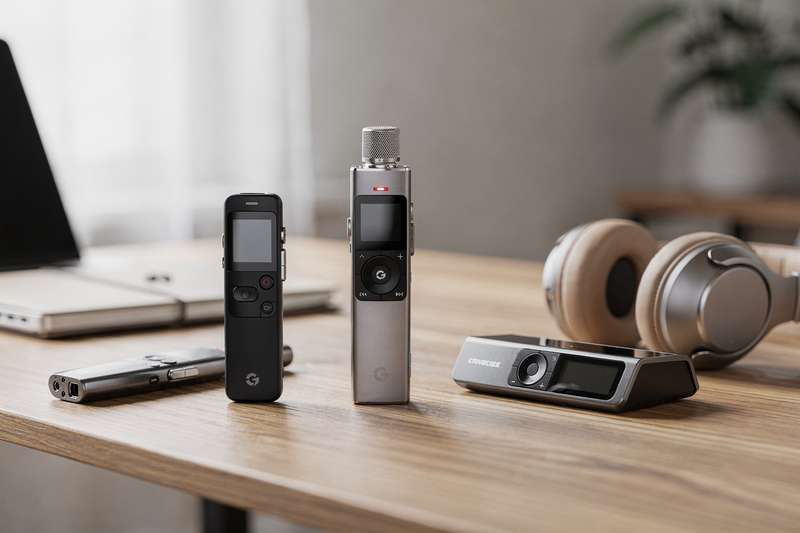
You pull out your phone to record an important meeting. Battery at 8 per cent. The air conditioning is drowning out the speaker at the far end of the table. A notification ping fires halfway through the key decision being discussed, briefly cutting across the recording app. If you rely on your smartphone to capture audio for work, interviews, or lectures, these frustrations are familiar — and they add up in ways that matter when you later discover the recording is unusable.
A dedicated voice recorder removes those variables entirely. It exists to capture audio and nothing else: no competing apps, no calls cutting through, no battery anxiety when you need continuous recording across a three-hour session. The challenge is that the market now spans everything from no-frills budget dictaphones to AI-powered meeting recorders with automatic transcription and cloud summaries — and picking the wrong level for your situation means either paying for features you’ll never use or ending up with a device that can’t handle the job you bought it for.
This guide covers six picks across different tiers and use cases, so you can match the right recorder to how you actually work.
How These Picks Were Evaluated
The shortlist was built by analysing real buyer feedback patterns across hundreds of verified UK Amazon reviews, weighting recurring complaints as heavily as consistent praise — a strong average score means little if the same criticism appears repeatedly and points to a flaw in the core function. The evaluation covered: microphone sensitivity and clarity at realistic distances (across a meeting room table, for example), how reliably voice-activation handles variable ambient noise, file format options and transfer ease on both Windows and Mac, battery longevity under continuous recording conditions, and how intuitive the controls are without needing the manual. Where AI transcription is a headline feature, reviewer reports on real-world accuracy — accounting for accents, multiple speakers, and specialist vocabulary — shaped the assessment significantly. Storage capacity, charging standards, and build durability rounded out the framework.
Best Overall
The 64GB Digital Voice Recorder with One Button 3072 Kbps HD Recording Noise Reduction Enhanced Audio Dictaphone with Lock & Type-C Charge sits at the top of this list because it gets the essentials right without overcomplicating the experience. At 4.8 stars from 92 reviewers, it consistently draws praise for audio clarity and ease of use — two qualities that should be non-negotiable in any recorder but which lower-cost models frequently sacrifice at least one of.
The one-button operation is genuinely practical when you need to start recording fast. Press once to begin, press again to pause or stop. For journalists who need to hit record mid-conversation, or students who want audio captured the moment a lecture begins, this simplicity prevents missed moments. There’s no navigating menus under pressure or accidentally opening the wrong function at a critical point in proceedings.
Noise reduction helps in environments like open-plan offices or lecture theatres where ambient hum and background chatter would otherwise undercut speech clarity. The 3072 Kbps recording resolution sits well above what most users need for voice capture, giving you a quality buffer even when conditions aren’t ideal. The 64GB internal storage means you can record across weeks of sessions before needing to offload anything to a computer.
Type-C charging is a welcome modern detail: no hunting for a proprietary cable. The device lock feature protects against accidental recording triggered in a bag or pocket — a small inclusion that matters when you’re reviewing your files later and want clean recordings rather than an hour of muffled rustling.
Where this recorder has limits is in professional audio production contexts. There’s no manual gain control, no multi-channel capability, and no AI transcription. It’s built for speech capture, not music recording or complex field audio work. Podcasters wanting precise control over input levels would need a more specialised device. But for the majority of use cases — business meetings, lectures, personal dictation, interview capture — this covers the brief with quiet efficiency. The combination of top-rated performance, modern charging, and generous storage makes it the most balanced option at its price tier, and the default recommendation for buyers who aren’t certain exactly which feature set they need.
Best Budget Pick
If the priority is a reliable dictaphone without significant financial commitment, the Digital Voice Activated Recorder – 3072Kbps HD Dual MIC Dictaphone with Noise Reduction, 4200 Hours Audio Recording is backed by more real-world use than any other option in this guide: 761 UK Amazon reviews at 4.2 stars. That review volume means the performance data comes from a genuinely broad user base, not a handful of early adopters with particular requirements.
The dual microphone configuration is the standout specification at this price level. Two mics arranged to capture audio from different directions produce a noticeably more balanced recording in group settings where not everyone is facing the same way — a round-table discussion, a classroom, a team meeting with participants scattered around the room. With a single-mic recorder, voices at the periphery of the pickup pattern can fade in the recording. The dual setup reduces that problem meaningfully in practice.
Voice-activated recording (listed as VAR or AVR mode on many devices) starts the recorder when it detects sound above a threshold and pauses when the room goes quiet. For lecture capture, this is particularly useful: you’re not wading through extended gaps when the lecturer is writing on the board or waiting for student responses. The result is cleaner audio files with less post-session editing required. The headline capacity of 4,200 recording hours gives a sense of the storage generosity on offer — in everyday use, you’re very unlikely to approach that ceiling.
Noise reduction at HD quality helps in moderate acoustic environments, though like all budget-tier processing it has limits. In genuinely challenging conditions — a busy open-plan office, a train carriage, a room with very loud HVAC — audio degradation will be noticeable in ways that a more expensive recorder handles more gracefully. The menu navigation takes a short learning curve that most reviewers report resolves after a couple of sessions. For students recording lectures, professionals keeping voice notes, or anyone who wants a capable backup recorder without significant outlay, this is the pragmatic, well-tested choice with extensive real-world evidence behind it.
Best for Business Meetings
The Comulytic Note Pro AI Voice Recorder, AI Taking Device and Meeting Recorder approaches voice recording from a fundamentally different angle to a conventional dictaphone. Rather than storing audio files for manual review, it integrates AI note-taking designed to convert meeting recordings into structured, actionable summaries. At 4.4 stars from 384 reviews, it has built a substantial user base among professionals who need more from their recorder than raw audio output.
The appeal in a business context is clear. After a client call, strategy session, or deposition, you don’t always have time to re-listen to the full recording. If the AI note-taking produces accurate, well-structured summaries, it removes a significant chunk of post-meeting administration. Reviewers in professional roles — project managers, consultants, legal teams — consistently highlight the time saving as the device’s strongest real-world benefit.
That said, AI transcription quality depends heavily on audio clarity, the number of simultaneous speakers, accent diversity, and the presence of specialist terminology. Users recording highly technical or jargon-dense discussions — medical, legal, engineering — typically find that AI summaries need careful human review before being acted upon. Treat the AI output as a structured first draft rather than a finished document, and this recorder becomes a useful productivity tool. Expect it to substitute fully for careful human review, and you’ll encounter problems.
The device is purpose-built for professional desk and meeting room use rather than casual carry-around portability. It sits at the higher end of the mid-range tier, reflecting the software development that separates it from a basic recorder. For buyers who run or attend multiple structured meetings each week and need to convert them into referenced notes quickly, the Comulytic Note Pro addresses that specific workflow better than anything else in this guide. For users who mostly record lectures or occasional interviews and rarely need AI summarisation, the additional cost over a standard recorder won’t be justified.
Best for Transcription
The AI Voice Recorder 80GB with Playback & Free AI Transcription & Summarisation offers an appealing combination: substantial local storage alongside AI-assisted transcription bundled as part of the purchase rather than a recurring subscription. At 4.8 stars from 19 reviews, the sample size is smaller than ideal, but the early feedback is consistently positive — particularly around transcription quality relative to the price tier.
The 80GB storage is the most generous in this guide by some margin. If you record frequently and in long sessions — researchers conducting multi-day interview projects, journalists on extended field assignments, oral historians archiving community records — the headroom means you can work across weeks without constantly offloading files to a computer. This storage advantage separates it clearly from the 32GB and 64GB options at lower price points.
The “free” transcription aspect has practical significance that’s easy to overlook. Some devices at this tier link AI features to a companion app requiring a monthly subscription, meaning the hardware cost is only the entry point into a longer spending commitment. This recorder includes transcription within the purchase price, which for buyers who dislike recurring software fees represents a meaningful difference in the true cost of ownership over time.
Transcription quality varies with audio conditions, as with any AI system. Standard office meetings and clear one-on-one interviews in moderate acoustic environments draw positive feedback from reviewers. The built-in playback function lets you review recordings directly on the device immediately after capture — useful when you want to verify you caught everything before your subject leaves, without needing to reach for a laptop. As a relatively new listing with a growing review base, checking recent buyer feedback before ordering is sensible, but the initial signals are encouraging for buyers who want AI assistance without the premium cost of the most established AI recorder ecosystems.
Best for Long Recording Sessions
The Digital Voice Recorder, Vandlion V11 32GB (2450Hrs) HD Clear Recording is aimed at situations where you need to record for extended periods without actively managing the device. The 2,450-hour recording capacity is the headline specification, and it’s relevant for anyone who records continuously or semi-continuously — long depositions, extended field research, overnight acoustic monitoring, or users who simply want the reassurance of never running out of recording room mid-session.
At 4.1 stars from 60 reviewers, the Vandlion V11 generates solid rather than exceptional feedback — a recorder that does its job reliably without generating the kind of enthusiasm that comes from surprising the user with unexpected quality. That consistency is actually a positive indicator for a device you’ll rely on in unattended or low-maintenance recording scenarios where you can’t babysit it. The HD clear recording specification means audio quality doesn’t take a back seat to endurance, which is the balance that matters most when capturing important verbal exchanges over long durations.
The practical use cases for this level of capacity include legal depositions running across multiple hours, academic researchers recording extensive participant interview programmes, or professionals who want to place the recorder on a desk and retrieve it at the end of a session. It handles passive, set-and-leave recording without demanding attention, which is exactly what those scenarios require.
Where the Vandlion V11 shows its limits is in features beyond core recording. There’s no AI transcription, no cloud connectivity, and no sophisticated voice-activation processing. It captures audio, stores it, and transfers it via USB. Your post-recording workflow will involve manual listening or third-party software unless you’re using it for monitoring rather than structured content capture. The 32GB internal storage is lower than some alternatives in this guide, but given the device’s efficient encoding across 2,450 hours, the ceiling is unlikely to be reached in normal use. Think of it as a specialist tool for high-volume, low-feature-demand recording — better at that specific job than a feature-rich device that can’t match the endurance.
Best for Flexible Storage
The 100H Voice Audio Recorder Digital, Expandable Via Memory Card takes a different approach to storage than the rest of this guide’s picks: rather than relying on fixed internal memory, it accepts a memory card, letting you scale capacity as your archiving needs grow. At 4.0 stars from 48 reviews, it’s the most conservatively rated option here — but a closer look at the feedback shows largely positive sentiment, with the aggregate influenced by a small number of initial setup complaints rather than fundamental audio quality concerns.
The expandable storage is the genuine differentiator. For researchers, oral historians, or podcast producers who archive large volumes of audio and need physical backups on separate cards, the workflow of swapping cards and storing each as an independent archive is more practical than repeatedly tethering a fixed-storage device to a computer. It also protects against the scenario where you fill the internal memory during a field project with no laptop on hand — swap in a fresh card and continue recording without interruption.
The 100-hour recording figure relates to the device’s built-in internal endurance before any card is added. Once a memory card is inserted, that ceiling extends considerably depending on the card capacity you choose. Buyer feedback consistently notes audio clarity appropriate for standard voice capture in meetings and interviews, though in challenging acoustic environments the processing doesn’t compete with the higher-rated picks in this guide.
This is a conventional digital recorder without AI transcription, sophisticated noise reduction, or advanced voice activation. For archive-focused users who value the flexibility of card-based storage over AI extras, it fills a gap the other picks don’t address. One practical note before ordering: check that your preferred memory card format is supported — this is the most common source of early setup frustration in the reviews, and it’s an easily avoidable issue with a quick look at the product listing specifications beforehand.
What to Look For in a Voice Recorder
- Microphone configuration: A single omnidirectional microphone captures sound from all directions but picks up more ambient noise. Dual-mic setups or directional microphones handle group settings and noisier environments more effectively. Look for devices that specify active noise reduction — in real-world conditions, this has a significant effect on clarity that simply doesn’t show up in a quiet testing environment.
- Voice-activated recording (VAR/AVR): This feature starts the device when it detects sound above a threshold and pauses during silence, keeping files tidy without lengthy silent gaps. Look for adjustable sensitivity settings — a fixed threshold can miss quiet speakers or trigger unnecessarily on continuous ambient noise like air conditioning hum or traffic.
- Storage capacity and expandability: For casual use, 16GB to 32GB is typically sufficient. Daily professional users or those archiving large volumes benefit from 64GB or more, or a device that accepts memory cards for flexible expansion. Fixed internal storage is more convenient for everyday carry; expandable storage is more practical for long-term archiving workflows.
- Charging standard: Modern recorders use Type-C, which is far more convenient than proprietary leads or older Micro-USB connections. Recorders using AA batteries are still available and carry the advantage of being replaceable anywhere — useful for field work in locations where charging infrastructure may be unreliable or unavailable.
- AI features and subscription model: AI transcription and summarisation is now available across all price tiers. The key questions before buying: does the AI process on-device (offline-capable) or require an internet connection? Is transcription included in the purchase price or behind a monthly subscription? How does it perform with regional accents, technical terms, and multiple simultaneous speakers? Recent buyer reviews from users in your specific field will give you far more reliable accuracy data than manufacturer claims.
- File format: MP3 is compressed and space-efficient; WAV is uncompressed and preferable for editing or professional transcription work. If you plan to edit recordings or share them with a transcription service, WAV preserves the full audio signal. For straightforward voice notes and meeting capture, MP3 at a reasonable bitrate is typically sufficient for the task.
- Form factor and build: Lightweight bar-style recorders balance portability with microphone placement. Ultra-compact clip-on or keyring devices are more discreet but use smaller microphones with narrower pickup patterns. For stationary desk use in meetings, a slightly larger device with better mic positioning will outperform an ultra-compact equivalent in actual recording quality across the room.
Verdict
For the majority of UK buyers — students, business professionals, journalists, and researchers — the 64GB Digital Voice Recorder with One Button 3072 Kbps HD Recording Noise Reduction Enhanced Audio Dictaphone with Lock & Type-C Charge is the strongest all-round choice. The 4.8-star rating from a meaningful reviewer base reflects consistent real-world performance, the one-button operation suits fast-paced use, and the combination of 64GB storage, Type-C charging, and noise reduction covers the practical bases without unnecessary complexity.
If budget is the primary constraint and you want the most thoroughly tested option in the category, the dual-mic voice-activated recorder with over 700 verified reviews provides confidence rooted in a broad, real-world user base. For professionals who need to convert meetings into structured notes rather than manage raw audio files, the Comulytic Note Pro addresses that specific workflow more directly than any conventional recorder here. And if continuous recording over extended periods is the priority, the Vandlion V11’s capacity-focused design suits that use case better than any feature-rich alternative.
Start by identifying where you’ll use the recorder most often, then match to the pick that aligns with that scenario. A well-chosen voice recorder becomes almost invisible in use — it just captures what you need, reliably, every time.
We were not paid to feature any specific product in this guide. All opinions are independent and based on publicly available specifications, verified buyer feedback patterns, and category research.
Quick Comparison Table


FAQ
What is the difference between a voice recorder and a dictaphone?
The terms are largely interchangeable in everyday use. “Dictaphone” originated as a brand name (later genericised) for devices used in office dictation, where someone would speak notes for a typist to transcribe. Today both refer to handheld digital audio capture devices that function the same way. “Dictaphone” tends to appear more in professional and legal contexts; “voice recorder” is the more common consumer-facing term across all settings.
Can a voice recording be used as evidence in the UK?
Audio recordings can be submitted in UK legal proceedings, but admissibility depends on context, how the recording was obtained, and the rules of the specific court or tribunal. Recording a conversation you are participating in is generally lawful for personal use, but recording others without their knowledge raises legal and ethical questions, particularly in employment disputes or civil proceedings. If you intend to rely on a recording as legal evidence, take specialist legal advice before doing so.
How much storage do I need in a voice recorder?
For most users recording lectures, meetings, or interviews, 16GB to 32GB accommodates hundreds of hours of compressed MP3 audio — far more than typical use generates between file transfers. If you record daily, prefer uncompressed WAV files, or want to minimise how often you offload recordings, 64GB to 80GB provides comfortable headroom. A device that accepts memory cards gives you the most flexibility to scale as your archiving needs grow over time.
Do AI voice recorders work without an internet connection?
This varies significantly by device. Some AI recorders process transcription and summaries entirely on-device and work fully offline, while others upload audio to a cloud service and require Wi-Fi or mobile data. If offline use matters to you — field research, remote interviews, or travel — check the product listing and recent buyer reviews specifically for this detail, as manufacturers don’t always make the distinction obvious in their marketing materials.
What is the difference between MP3 and WAV recording formats?
MP3 is a compressed format producing smaller files, practical for long sessions where storage efficiency matters. WAV is uncompressed, preserving the full audio signal — preferable if you plan to edit the recording, send it to a professional transcription service, or need maximum audio detail. For everyday meeting notes and lecture capture, MP3 at a decent bitrate is typically sufficient. If in doubt, record in WAV where storage allows: you can compress down later, but you cannot recover quality lost during initial compression.
Is a dedicated voice recorder worth buying if I already use a smartphone?
For occasional informal use, a smartphone recording app is adequate. A dedicated recorder becomes worthwhile when reliability matters: multi-hour sessions where battery drain is a real risk, environments where notifications or calls cannot interrupt the recording, and professional contexts where consistent audio quality is non-negotiable. Dedicated recorders also keep the recording task separate from your phone’s storage and battery demands, which simplifies file management and reduces friction in professional workflows.