You’re two minutes from a client call. Notes ready, slides open — then you catch yourself in the camera preview: grey-skinned, shadowed under the eyes, lit like someone has hung a bare bulb directly above your head. The ceiling light points straight down. The curtains are half-shut to stop the afternoon sun from glaring on your monitor. The bedside lamp you dragged over last week is bouncing a warm blob of light straight into the lens. Your webcam preview shows someone who looks considerably less composed than you actually feel.
That frustration — looking fine in your mirror but tired and washed-out on camera — is almost universal among home workers, and it has a concrete cause. Standard desk lamps are engineered to light a page or a keyboard, not a face. They produce tight pools of illumination with hard edges, often introduce a flicker that your camera sensor amplifies even when your eye skips right over it, and most sit at angles that carve shadows under your jaw rather than filling your face with even, flattering light. The fix isn’t a better webcam or a tidier background — it’s the right dedicated light source.
This guide covers the best LED desk lamps and dedicated video call lighting options currently available on Amazon UK, with a focus on glare-free diffusion, flicker-free output, practical adjustability, and how each pick actually performs once you’re live on a call.
How These Picks Were Evaluated
Every product on this list was drawn from the current Amazon UK catalogue for LED desk lamps and dedicated video call lighting. The key criteria were: flicker-free LED output (your camera is more sensitive to 50Hz flicker than your eye — it shows up as a visible pulse in recordings and live footage), CRI or colour rendering index (which determines whether your skin tone looks natural or oddly tinted on camera), the practical range and granularity of brightness control, colour temperature flexibility from warm to cool white, physical adjustability including arm reach and tilt angle, and mounting options suited to different desk layouts. All picks were cross-referenced against genuine buyer review patterns on Amazon UK. Products with no published reviews were excluded where reviewed alternatives existed at comparable price tiers.
Best Overall for Video Calls
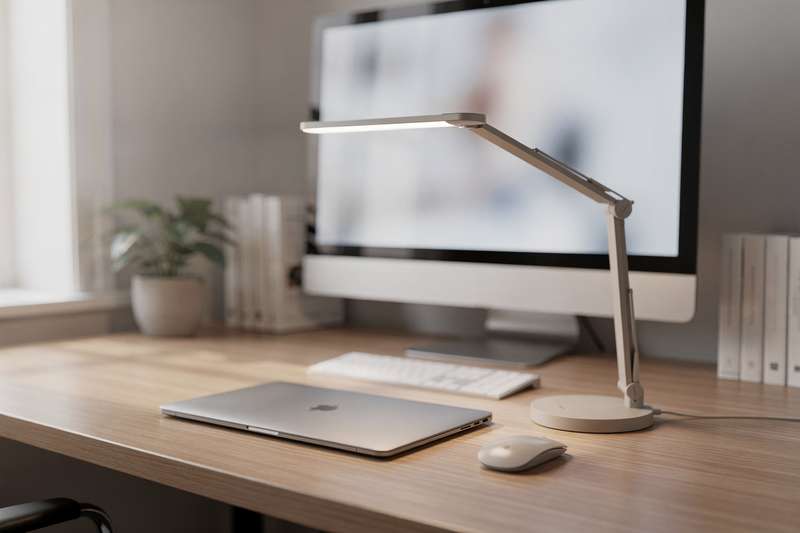
The LitONES LED Desk Lamp for Home Office is the pick most home workers should start with, and the reason is direct: it was engineered specifically for video call use, with glare-free diffusion and flicker-free output listed as headline features rather than passing footnotes. At 4.8 out of 5 stars from over 800 UK buyers, it carries one of the most consistent positive review samples in this category — and the character of that feedback is telling. Reviewers talk about it improving how they look on camera, not merely how comfortable their workspace feels.
The 1,200-lumen output is meaningfully bright for a desk lamp, but what matters more is how that brightness is delivered. A diffuser panel softens the light before it reaches your face, eliminating the hard hotspots a bare LED array would create at close range. Hard light on skin looks harsh on camera even at moderate brightness, because your webcam doesn’t have the dynamic range your eye does — it records the contrast between lit and shadowed areas more starkly than you perceive it in the room. The 30 lighting modes give you genuine flexibility across both brightness and colour temperature: dial in a warmer tone for early-morning calls when the room light is cold, push cooler for afternoon sessions when you want a sharper, more alert appearance on screen.
What this lamp does particularly well is consistency. Many cheaper lamps are technically dimmable but produce visible flicker at lower settings — a camera catches this as a strobing artefact that looks thoroughly unprofessional in recordings and on live calls. The flicker-free design addresses that directly. Buyers consistently report that their webcam footage looks noticeably cleaner once they switch, without any changes to camera settings required.
The tradeoffs: this is a freestanding lamp, so it occupies base footprint on your desk. The arm design offers solid adjustability but isn’t a full swing arm, so you’re working within a fixed reach radius. For a single monitor or laptop setup with a fixed camera position, it handles the job cleanly. If your setup changes frequently or you need to cover a wide dual-monitor arrangement from one lamp, the swing arm option below may suit you better.
Build quality is consistently praised across the review sample, and the control interface is described as intuitive rather than fiddly. A small number of reviewers raise longevity concerns after extended use — worth noting, though not a widespread pattern. Treat it as a solid working tool rather than a permanent fixture and it’s a strong purchase at this tier.
Best for Flexible Arm Positioning
The LitONES Dimmable Swing Arm Desk Light is the right choice if your setup changes during the day, or if you want a lamp that transitions cleanly between video call use and focused task work at different positions on your desk. The swing arm is the critical differentiator: rather than a fixed column that points where it points, you can extend, retract, and redirect the lamp head without moving the base. Once you’ve worked with a flexible arm lamp on a busy workstation, a fixed-arm lamp feels immediately constraining by comparison.
The output specification matches the best overall pick — 1,200 lumens through a diffuser panel — and the same flicker-free, eye-caring soft light character carries over. What changes is adaptability. You can raise the head to replicate the effect of a ring light at camera height, angle it from one side to add subtle dimension and shape to your face on camera, or pull it back when you switch to close work at a different part of the desk. For anyone who genuinely uses their desk for multiple tasks throughout the day, this reconfigurability has real daily value.
The memory function is easy to dismiss from a spec list but useful in practice. Once you’ve found the brightness and temperature combination that works for your morning call environment and a second setting for afternoon work, the lamp stores those preferences and returns to them on power-up. It’s a small but consistent time-saver across weeks of daily use.
Where it falls slightly short of the best overall pick: the review count sits at around 319, giving a smaller data set to draw on, and the aggregate rating of 4.7 stars is excellent, but a notch below the 4.8 of the top pick. The swing arm mechanism adds one more moving part that could theoretically loosen over time, though reviewers don’t flag this as a widespread problem. The base holds well for ordinary desk use.
For a static, single-use setup, the best overall pick is the marginally more refined choice. For a workstation where the lamp needs to do different things at different points in the day, the swing arm design justifies the difference in form factor.
Best Ring Light Style for Video Calls
The LitONES Desk Ring Light for Video Call takes a fundamentally different approach from the panel lamps above — a circular LED ring positioned at desk level and at camera height, producing even illumination with a characteristic circular catchlight in the eye that’s associated with polished on-camera presentation. It’s the most reviewed option in this roundup, with over 850 ratings at 4.6 stars, giving you the broadest real-world feedback sample to draw on.
The ring light format addresses a problem that even good overhead lighting can’t fully solve: when the light source sits above and behind the camera, it creates subtle shadows across the lower face that read poorly on screen. A ring light at camera level removes those shadows structurally — the illumination surrounds the lens rather than striking your face from a single angle. For anyone whose face photographs unevenly under directional light, with one cheek noticeably brighter than the other, this design removes that issue at its root.
The included stand and phone holder make it directly practical if you take calls on a mobile device. Position the phone in the holder, centre the ring behind it, and the light lands on your face at camera level automatically. For laptop or desktop camera users, the positioning principle is the same: match the height of the ring to the height of the lens. With 30 lighting modes covering both brightness and colour temperature, there’s sufficient control to adapt across different room conditions and times of day.
The honest limitation: the ring light look is recognisable. The circular catchlight in the eye signals content creator to some viewers — flattering, but identifiable as a particular kind of setup. Ring lights also require clear desk space in front of the camera, so if desk real estate is tight, the clamp option may suit you better. That said, if you switch between work calls and any form of content creation, this is a practical two-in-one purchase that handles both without a separate lighting rig.
Best for Cluttered or Small Desks
The LitONES LED Desk Lamp with Clamp and Remote solves a problem the freestanding options in this guide don’t address: what to do when your desk is already full. By clamping to the edge of the desk rather than sitting on a base, it removes itself entirely from your working surface. On a crowded workstation carrying dual monitors, a keyboard, notebooks, and a tangle of cables, that distinction matters every time you sit down to work.
The clamp mechanism grips the desk edge and anchors the adjustable arm securely. The lamp head can be positioned above the desk and angled downward toward your face — the geometry that most reliably produces flattering, even video call illumination. At 4.8 stars from 190 reviewers, it’s the joint highest-rated pick in this roundup. With 30 lighting modes matching the versatility of the freestanding models, you’re not compromising on brightness range or colour temperature control by choosing the clamp format.
The included remote control addresses a practical issue common with clamped lamps: the head often ends up in a position you can’t comfortably reach mid-call. With the remote, a quick brightness tweak or colour temperature adjustment doesn’t require leaning across your desk or pausing what you’re doing. Touch controls on the lamp itself serve as a backup. Buyers describe both interfaces as responsive, and the 30-mode spacing as well-judged rather than having too many settings clustered at the same effective brightness level.
The one thing to verify before ordering: clamp mounts require a compatible desk edge. Very thick profiles, very thin surfaces, or rounded edges can prevent the clamp from seating properly — and an improperly fitted clamp won’t hold the lamp securely. Check the clamping range in the product listing and measure your desk edge before you commit. This is the most commonly cited source of dissatisfaction with any clamp lamp, and it’s entirely preventable. A correctly fitted clamp is as stable as any freestanding base in normal use.
This is also the most portable option in the roundup. If you sometimes move between workspaces, or share a desk and need a lamp that can be detached and reattached without leaving marks or occupying permanent surface area, the clamp format is practical in a way that a weighted base simply isn’t.
Best Budget Pick
The yAyusi Dual-lamp Video Conference Lighting takes a different structural approach from everything else in this guide: two small LED panels on flexible arms, designed to light your face from both sides simultaneously. At 4.2 stars from over 650 buyers, it has the widest review base at the entry price tier — and also the most varied feedback, which reflects the nature of the product. It works well for a specific type of setup, and buyers who match that setup find it effective. Those who don’t occasionally find the dual-arm configuration more trouble than it’s worth.
The dual-lamp format solves a real problem with single light sources: one-sided illumination. A single lamp positioned to your left creates a brighter left cheek and a shadowed right, which reads as dramatic rather than professional on camera. Two lamps positioned symmetrically on either side of the camera produce shadow-free, even coverage that can look more natural than a single ring light for certain face shapes and setups. Remote and touch controls give you quick access to brightness and temperature, and the available settings are calibrated for the video call context rather than general ambient lighting.
The tradeoffs are real and worth understanding before you buy. Getting two separate light heads balanced correctly takes more initial fiddling than positioning a single lamp. The flexible arms hold their position once set, but some reviewers note they can drift slowly over time and need occasional repositioning — usually a brief tweak rather than a full reset. Build quality reflects the price point: functional rather than premium, and noticeably lighter in construction than the LitONES models elsewhere in this guide.
The light output is also more modest than the 1,200-lumen panel lamps here — adequate for a laptop webcam or desktop camera at typical desk distance, but less suitable for a camera positioned further back or a larger room. For anyone trying dedicated video call lighting for the first time and wanting to understand whether it makes a genuine difference before committing to a mid-range purchase, this is a reasonable starting point with realistic expectations.
Best for Colour Accuracy
The LitONES Desk Ring Light with Stand and Phone Holder is the pick when colour accuracy matters most — for medical teleconsultations, professional client-facing calls, beauty or teaching content, or any context where your skin tone needs to look correct on camera rather than merely visible. Its stated CRI of 97.8 is the highest explicitly listed figure across all the options in this guide. CRI — colour rendering index — measures how accurately a lamp renders the colours it illuminates compared to natural daylight, on a scale of 1 to 100. Above 90 is good; above 95 is excellent; 97.8 sits at the practical ceiling for a consumer desk light.
In practice, this means: on a lower-CRI lamp, skin may carry a subtle yellow, grey, or pink cast depending on the LED spectrum — your camera records this literally even when your eye has automatically compensated for it. With a very high CRI, your skin tone on camera should closely match how you look in natural daylight, without webcam colour adjustment or any post-processing. For anyone who has already tried adjusting white balance on their webcam and hasn’t fully resolved an off-colour appearance, the light source itself is usually where the remaining problem sits.
With 10 brightness levels across 3 colour temperature settings (warm, neutral, and cool white), the controls are simpler than the 30-mode options elsewhere in this guide — but the three temperatures available cover the scenarios most directly relevant to video call use. The flicker-free, soft light output is an explicitly stated feature, which means your camera isn’t contending with a problematic light source as well as trying to render colours accurately. At 4.6 stars from over 600 UK buyers, the feedback is consistent: light quality and skin-tone accuracy are the most frequently praised attributes.
The ring light format brings the same practical considerations as the ring light pick above — desk space required in front of the camera, a visible catchlight in the eye, and a stand-based rather than clamp-based design. The phone holder makes it practical for mobile call setups. If you’re satisfied with the colour rendering your current lamp produces, the day-to-day improvement here will be modest. But if skin tone accuracy is where your existing setup is falling short, this is the most direct solution available at this price level.
What to Look For in a Video Call Desk Lamp
- Flicker-free output: This is non-negotiable for video call use. Camera sensors amplify 50Hz flicker from unregulated LED drivers — even when your eyes can’t detect it, your colleagues may see a faint pulsing in your image or in recorded footage. Look for lamps that explicitly state flicker-free operation in their specifications.
- CRI (Colour Rendering Index): Aim for a CRI of 90 or above for video calls. At 95 and above, the improvement to skin tone rendering on camera becomes clearly visible. Below 80, skin tones can appear grey, yellow, or oddly tinted regardless of how bright the lamp is.
- Adjustable colour temperature: You want at least two settings — warm (around 3,000K) for early-morning calls or artificial-light environments, and neutral to cool (around 4,500–5,500K) for daytime sessions. A three-setting option covering warm, neutral, and cool white handles most real-world scenarios comfortably.
- Fine-grained dimming: A lamp with only two or three brightness steps makes it difficult to match ambient light conditions precisely. Look for ten or more brightness steps, or stepless dimming, so you can dial in the right intensity without overexposing your face or washing out the camera image.
- Mounting type: Freestanding lamps require clear desk surface; clamp mounts attach to the desk edge and free up working space; ring lights need clear desk area in front of the camera. Choose based on your actual desk layout — a clamp mount on an incompatible edge profile will be a recurring frustration rather than a solution.
- Height and reach: The lamp head should reach approximately monitor-top height and angle slightly downward toward your face. A lamp sitting below camera level lights you from underneath — unflattering on camera and visually odd. Check the maximum height against your actual monitor and camera position before ordering.
- Controls and memory: Touch controls on the lamp are standard across this category. A remote control is a practical upgrade if the lamp head ends up in a position that’s awkward to reach mid-call. A memory function that recalls your last settings on power-up is a quiet but daily quality-of-life improvement for anyone using the lamp at the same settings every morning.
Verdict
For most UK home workers with a single monitor or laptop setup, the LitONES LED Desk Lamp for Home Office is the right starting point. It was built for exactly this problem — glare on camera, flicker in recordings, uneven face lighting — and the 800-plus reviewer sample at 4.8 stars tells you it delivers on that brief consistently. The 30-mode control range, flicker-free diffuser panel, and solid build cover the core requirements without unnecessary complexity or setup time.
If your desk is already cluttered, the clamp-mounted LitONES model is the practical alternative — same quality level, different physical footprint, with the bonus of a remote control. If accurate skin tone rendering is a professional requirement, the CRI97.8 ring light offers the most direct solution at this price level. And if you want to test whether dedicated video call lighting genuinely makes a difference before committing to a mid-range outlay, the yAyusi dual-lamp is a reasonable entry point — honest about its limitations at the budget tier.
The clearest sign that your video call lighting is working is that you stop noticing it during meetings. Any of these picks will get you meaningfully closer to that point than a repositioned reading lamp and a camera settings tweak.
We were not paid to feature any specific product in this guide. All opinions are independent and based on publicly available specifications, verified buyer feedback patterns, and category research.
Quick Comparison Table


FAQ
Do I really need a dedicated lamp for video calls, or can I just reposition my existing desk lamp?
A repositioned desk lamp can help, but most standard lamps aren’t built for the demands of video call lighting. They typically have narrower, harder beams, higher flicker rates at dim settings, and lower CRI values than purpose-designed options. If you’re taking professional or client-facing calls regularly, a purpose-built lamp produces a noticeably better result — consistent, flattering output and flicker-free operation that your camera sensor won’t amplify into visible strobing.
What is CRI and does it actually matter for video calls?
CRI stands for Colour Rendering Index — it measures how accurately a light source renders colours compared to natural daylight, on a scale of 1 to 100. For video calls, a higher CRI means your skin tone appears more natural and accurate on camera. Below 80, skin tones can look washed out or strangely tinted; above 90, colours render clearly; above 95, the difference from natural daylight is very difficult to detect. If accurate skin tones matter for your use case — medical, teaching, beauty, or professional video work — aim for 95 or higher.
Is a ring light or a panel lamp better for video calls?
Both work well for video calls, but for different aesthetics. A panel lamp with a diffuser produces natural, even light that doesn’t announce itself — it looks like good ambient lighting to your viewers. A ring light creates a circular catchlight in the eye that’s flattering but recognisable, closely associated with streaming and content creation. If you want to look professional without the content-creator aesthetic, a diffuser panel is the subtler choice. If you also create content or stream, a ring light doubles up more naturally across both uses.
Can I use a desk lamp effectively with just a laptop’s built-in webcam?
Yes, without any extra equipment. Position the lamp at approximately the same height as your laptop screen and angle it toward your face rather than directly at the camera lens. The key principle is matching light source height to camera height — a lamp sitting below screen level will illuminate your chin and chest rather than your face. Most lamps in this guide adjust high enough to work correctly with a laptop on a standard desk.
Why does my current lamp look fine to my eye but unflattering on camera?
Camera sensors respond to light differently from human eyes. The two most common culprits are flicker (your brain averages out rapid fluctuations that the camera captures frame by frame, making pulsing visible in recordings) and mismatched colour temperature between your lamp and the ambient daylight in the room. Your brain corrects for colour temperature mixing automatically; the camera records it literally. A flicker-free lamp with adjustable colour temperature usually resolves both issues at once.
Are clamp-mounted desk lamps stable enough for daily use?
Yes, provided the clamp fits your desk edge correctly. Most clamp mounts hold securely once tightened and won’t shift in normal use. The main failure mode is an edge profile the clamp wasn’t designed for — very thick, very thin, or rounded edges can prevent a proper grip. Before ordering, check the clamping range stated in the product listing and measure your desk edge if it’s non-standard. A correctly fitted clamp lamp is as stable as any freestanding base.